• Skip to main content
  • Skip to primary sidebar
  • Home
  • About
  • Recommended Readings
    • 2022 Book Reading
    • 2023 Recommended Readings
    • Book Reading 2024
    • Book Reading 2025
    • Book Reading 2026
  • Supply Chain Management Guide
  • PKM
  • Microsoft Excel
  • Microsoft Copilot in Office 365
  • Public Wiki Page

Ali Raza Zaidi

A practitioner’s musings on Dynamics 365 Finance and Operations

Dynamics Ax 7

Pack the Sales Order In New Dynamics AX (AX 7).

May 23, 2016 by alirazazaidi

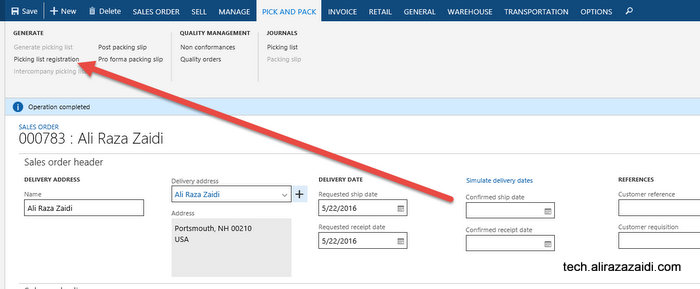
After pick list Generation, Click on Pick and Pack => Generate => Picking list registration

Picking List registration

Click on Updates => Update All.


Desing


After that click on end of form click x to close.

Close Page


Then Click on Pick and Pack => Generate => Post Packing Slip.

Post Packing Slip

Confirm Pack List

Click ok, You find that Sale order status is now update to Delivered.

Delivered Status


Page can not be display -The description for Event ID 110 from source Microsoft Dynamics AX cannot be found new Dynamics AX 7

March 21, 2016 by alirazazaidi

During development suddenly Ax stop working. When I try to connect web url https://usnconeboxax1aos.cloud.onebox.dynamics.com. It shows page can not display. Previously it was working fine.

On Event viewer I found following exception.


The description for Event ID 110 from source Microsoft Dynamics AX cannot be found. Either the component that raises this event is not installed on your local computer or the installation is corrupted. You can install or repair the component on the local computer.


If the event originated on another computer, the display information had to be saved with the event.


The following information was included with the event:


AX is shutting down due to an error.

Duplicate metadata element has been detected in multiple modules. Please verify that application is deployed correctly and installed modules are compatible. Following elements are defined in more than one module:

Element AxService/tstColorService is defined in the following modules: ServiceTest, ApplicationSuite


Solution: During development I created artifacts with same name in different models on different occasions. Surprisingly no warning or error appears during development about object of same name already exists in AOT. I open required solution rename artifacts and build solution. AX web application start working again.

Runnable classes and table browser in Dynamics Ax (Dynamics AX 7).

January 2, 2016 by alirazazaidi

Purpose of This post to explore the runnable classes to test the logic, checking the traditional X++ (AX 2012) code and new table explorer in Dynamics Ax 7.  This post is based on Dynamics AX (Dynamics AX 7) CTP 8.


In new Dynamics Ax (Dynamics AX 7) there is no more AX Jobs.  For testing certain logic we have to use runnable classes.


Suppose we have to test the logic for some service, which has data contract and Service contract classes.

Right click inside solution explorer and add new object and select runnable class.

New Item

New Job


Add test logic as

class HelloWorld

{

/// <summary>

/// Runs the class with the specified arguments.

/// </summary>

/// <param name = “_args”>The specified arguments.</param>

public static void main(Args _args)

{

ColorDC dc = new ColorDC();

ColorSc Sc = new ColorSc();

dc.parmColorName(“Red”);

Sc.InsertColor(dc);

dc.parmColorName(“Green”);

Sc.InsertColor(dc);


}


}


Now expand the project properties and set my Hello world class a start up object

sss


To explore the debug feature I add a break point and press F5. With debug window a new diaglonsitic tool runs, which shows memory and space used by my code processing.


I just test the traditional X++ code, Its works the same way as it was in Morphix editor in tradition AX (2012).

public void InsertColor(ColorDC Colorobj)


{


MyColorTable _Color;


Name _Name;


_Name = Colorobj.parmColorName();


select * from _Color where _Color.ColorName== _Name;


if (_Color==null)


{


try


{


ttsBegin;


_Color.ColorName = _Name;


_Color.insert();


ttsCommit;


}


catch


{


ttsAbort;


}


}


}


Now right click on table and from properties popup menu click on table browser.

2016-01-02_21-43-18


The new table browser inside Visual studio show me the values just inserted during debugging of above mentioned code.

sss3333

Running Dynamics Ax 7 CT8 Vm on Windows 8.1

December 17, 2015 by alirazazaidi

By writing of this post, I just download the AX7 CTP8 Vm and configure on my machine.

I successfully configure it on hyper V. Only one tricky point is external network adapter in Hyper V.


First step is download VHD and extract it to some place. If you are registered to AX 7 Feedback program, then you  must have vhd download link.

After the download, run the self-extract exe and extract the Vhd at specific location.

CTP8


2015-12-17_18-24-16

Step 2. Create a new external network adapter

Open hyper v console, and create new external network. As I am using wireless network, so I select it as bridge for using internet inside VM. You can use your Ethernet network as bridge.


2015-12-17_21-06-18


Step 3 Create a new Vm.

2015-12-17_21-01-54

Select generation 1 vm in next step

2015-12-17_21-04-01

2015-12-17_21-04-28


Set 8 GB ram to vm, recommend ram is 16 GB.

2015-12-17_21-04-56

Select network adapter we created in previous step.

2015-12-17_21-07-42

Select use existing hard drive and select the Vhd extracted in previous steps.

2015-12-17_21-08-33


Click on next and click on finished.


Run the VM and click on connect button. Login in with “Administrator” and Password is “pass@word1”


When VM is running you find new network connection ask your permission, Click on Yes button.

2015-12-17_21-15-34


Please check that network is working fine inside VM. Some times it will gives error “network has not assigned ip address”.  If external network adapter will not work then you have to create internal network and use that.

For this I create Internal network adapter in Hyper v. For currently I created a new internal adapter with name
“GateWayToInternet”.

internal

Now open the network and sharing center in windows. either using wifi or Ethernet. right click on it and from properties window select sharing tab.

Sharing

check the checked box for sharing internet and from drop down select the v Ethernet (which we create in one above step). stop the vm and use newly created internal network adapter in its network setting. When you start the vm. it will successfully access the internet and let you access ax 7 in browser.

For more detail for Internal networks setting please use following link, I used it for configuration.

http://wordsideasandthings.blogspot.com/2013/01/hyper-v-internal-virtual-network-and.html


Wait a few minutes and then open Internet Explorer and type following url


https://usnconeboxax1aos.cloud.onebox.dynamics.com


This will lead you at login page

2015-12-17_21-38-38


For login you need to use some office 365 account.  Currently I used my other account which i created for Microsoft Dynamics CRM trail. Possible if office 365 account did not work then register for CRM trail. 🙂

You may found “Provision tool” on the desktop of VM”.

2016-02-17_13-18-31

Right click on it and run it  as administrator.

enter your office 365 account  and click on submit.

2016-02-17_11-56-48

wait a few minutes. When  success message popup login with office 365 account.

2016-02-17_11-58-33


If your network Adapter is successfully configured, AX 7 welcome page will open, other wise you will find error page.


2015-12-17_21-42-56


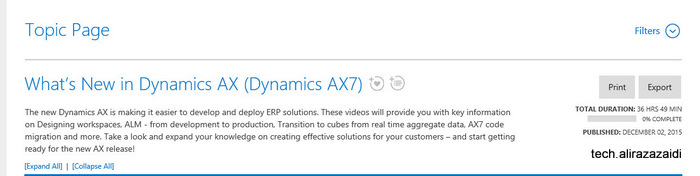
New video material on Dynamics Ax 7 at Microsoft Dynamics Learning portal

December 8, 2015 by alirazazaidi

I just login on Microsoft Dynamics Learning Portal and found that Microsoft Uploaded new videos for Dynamics Ax 7 under following heads

  • General
  • Retail
  • Technical Conference
  • Technical Conference –LCS
  • Technical conference courses

https://mbspartner.microsoft.com/AX/Topic/21


« Previous Page

Primary Sidebar

About

I am Dynamics AX/365 Finance and Operations consultant with years of implementation experience. I has helped several businesses implement and succeed with Dynamics AX/365 Finance and Operations. The goal of this website is to share insights, tips, and tricks to help end users and IT professionals.

Legal

Content published on this website are opinions, insights, tips, and tricks we have gained from years of Dynamics consulting and may not represent the opinions or views of any current or past employer. Any changes to an ERP system should be thoroughly tested before implementation.

Categories

  • Accounts Payable (2)
  • Advance Warehouse (2)
  • AI (3)
  • Asset Management (3)
  • Azure Functions (1)
  • Books (6)
  • Certification Guide (3)
  • ChatGPT (3)
  • Claude (1)
  • Customization Tips for D365 for Finance and Operations (65)
  • D365OF (60)
  • Data Management (1)
  • database restore (1)
  • Dynamics 365 (59)
  • Dynamics 365 for finance and operations (139)
  • Dynamics 365 for Operations (176)
  • Dynamics AX (AX 7) (134)
  • Dynamics AX 2012 (274)
  • Dynamics Ax 2012 Forms (13)
  • Dynamics Ax 2012 functional side (16)
  • Dynamics Ax 2012 Reporting SSRS Reports. (31)
  • Dynamics Ax 2012 Technical Side (52)
  • Dynamics Ax 7 (65)
  • Exam MB-330: Microsoft Dynamics 365 Supply Chain Management (7)
  • Excel Addin (1)
  • Favorites (12)
  • Financial Modules (6)
  • Functional (8)
  • General Journal (1)
  • Implementations (1)
  • Ledger (1)
  • Lifecycle Services (2)
  • Logseq (4)
  • Management Reporter (1)
  • Microsoft Excel (4)
  • MS Dynamics Ax 7 (64)
  • MVP summit (1)
  • MVP summit 2016 (1)
  • New Dynamics Ax (19)
  • Non Defined (9)
  • Note taking Apps (2)
  • Obsidian (4)
  • Personal Knowledge Management (3)
  • PKM (16)
  • Power Platform (6)
  • Procurement (5)
  • procurement and sourcing (6)
  • Product Information Management (4)
  • Product Management (6)
  • Production Control D365 for Finance and Operations (10)
  • Sale Order Process (10)
  • Sale Order Processing (10)
  • Sales and Distribution (5)
  • Soft Skill (1)
  • Supply Chain Management D365 F&O (5)
  • Tips and tricks (278)
  • Uncategorized (165)
  • Upgrade (1)
  • Web Cast (7)
  • White papers (4)
  • X++ (11)

Wiki

  • SCM

Copyright © 2026 · Magazine Pro On Genesis Framework · WordPress · Log in