• Skip to main content
  • Skip to primary sidebar
  • Home
  • About
  • Recommended Readings
    • 2022 Book Reading
    • 2023 Recommended Readings
    • Book Reading 2024
    • Book Reading 2025
  • Supply Chain Management Guide
  • PKM
  • Microsoft Excel
  • Microsoft Copilot in Office 365
  • Public Wiki Page

Ali Raza Zaidi

A practitioner’s musings on Dynamics 365 Finance and Operations

Dynamics AX 2012

Data Manipulation in Dynamics Ax 2012- Array as Extended Data Type

July 2, 2018 by alirazazaidi

I found a array based field in TSTimesheetLineWeek table, Field TSWeeklyHours

Now challenge is to enabled field based on Array. For example need to disabled on day 6.

Following code snippet help me to enabled disabled fields generated on the base of array extended Type

TSTimesheetLineWeek_ds.object(fieldId2Ext(fieldNum(TSTimesheetLineWeek, Hours), 6)).allowEdit(false);

Reference :

https://msdn.microsoft.com/en-us/library/aa675074.aspx

https://docs.microsoft.com/en-us/previous-versions/dynamicsax-2009/developer/aa592700(v=ax.50)
How to get Worker’s Dependent Dynamics Ax 2012 R3

June 3, 2018 by alirazazaidi

Here is small and quick tip. Couple of Days ago I helped a developer to get Dependent out of worker.

Microsoft provide a View DirPartyRelationshipsUnionView. Here Worker Party Id is saved as “otherParty” and dependent Party id can be found as ” SELFPARTY”.

Quick SQL query is below,

select name from DIRPARTYTABLE where recid in (

select SELFPARTY from DirPartyRelationshipsUnionView where OTHERPARTY =5637146826)

Updating Date Effective Tables in AX 2012, Dynamics 365 for finance and operations

May 21, 2018 by alirazazaidi

I was struggling to update Date Effective Table in Dynamics Ax 2012 R3. At least one hour of struggle, finally I update the required record.


Only good post which helps is by Agnela GoldBrg.


http://ibisinc.com/blog/updating-date-effective-tables-in-ax-2012/


One line tip from this post is on Date Effective table, The active record reference can be get with  of

DateTimeUtil::utcNow()


Its really small tip, yes learning and solving problem at hand waste hours.


Lets take a real world example We have to update Job detail with X++.


For HCMJobDetail table following way works for me.


hcmJobDetail=    HcmJobDetail::findByJob(hcmJob.RecId,DateTimeUtil::utcNow(),DateTimeUtil::utcNow(),true);


We can query on required table  with following  way


_validFrom = DateTimeUtil::utcNow();

_validTo =DateTimeUtil::utcNow();


select ValidTimeState(_validFrom, _validTo) hcmJobDetail

where hcmJobDetail.Job == _job;


The complete code snippet which works for me is here.


HcmJobDetail hcmJobDetail;

HcmJob hcmJob;

HCMJOBID  _id=’XyZ’;

date dateToday,


hcmJob = HcmJob::findByJob(_id);


_validFrom = DateTimeUtil::utcNow();

_validTo =DateTimeUtil::utcNow();


select ValidTimeState(_validFrom, _validTo) hcmJobDetail

where hcmJobDetail.Job == _job;


hcmJobDetail=    HcmJobDetail::findByJob(hcmJob.RecId,DateTimeUtil::utcNow(),DateTimeUtil::utcNow(),true);

if (hcmJobDetail!=null)

{

try

{

ttsBegin;


hcmJobDetail.validTimeStateUpdateMode(ValidTimeStateUpdate::Correction);

hcmJobDetail.SL_TempEndDate = today();

hcmJobDetail.SL_TempStartDate = today();

hcmJobDetail.Note = ” test and test”;


hcmJobDetail.update();


ttsCommit;

}

catch

{

ttsAbort;

HcmJob::CheckFailed(‘ Unable to update job’);

//    status  = SL_EntityStatus::Error;

}

}

}


}

System.Net.ProtocolViolationException: Cannot send a content-body with this verb-type. Dynamics Ax 2012 Json Service

May 9, 2018 by alirazazaidi

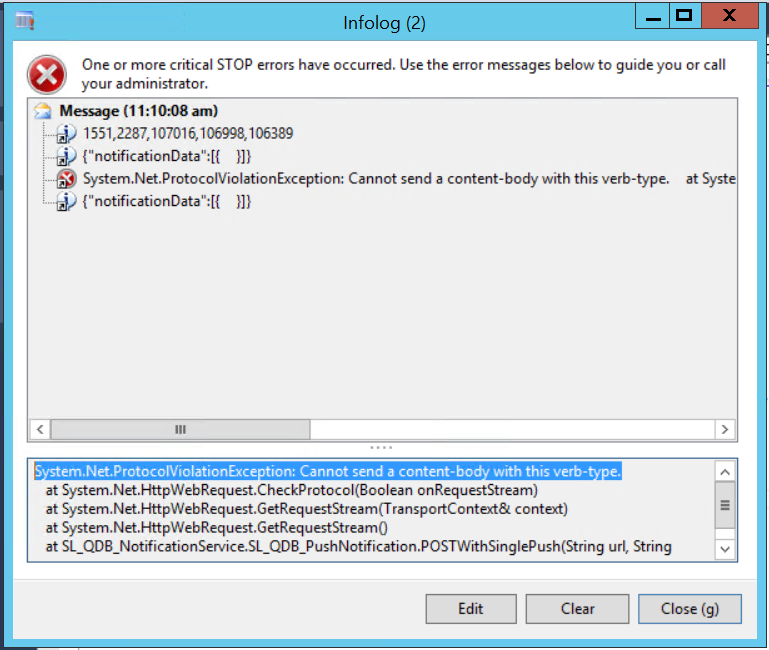
The piece of code you wrote, take long way to reach production server. And usually different errors occurs when we take code one server to other.  I test restful service code C# class and call it form X++  code multiple times and it works perfectly fine on QA. But when I took same code to Uat server it started throw following error

System.Net.ProtocolViolationException: Cannot send a content-body with this verb-type.


And why the same code works perfectly on DEV while calling same service method UAT throw errors.


Any how I found that I missed the request. Method = Post  in code snippet I used for service call. something like


request.Method = “POST”;

Json Service Call in Dynamics Ax 2012.

May 5, 2018 by alirazazaidi

Recently I got chance to call restful Json based service in Dynamics Ax 2012.

I used a C# class library and then add to AOT.  AX 2012

Json based service successfully called both client side and server side. Only tricky part was to make Json string or payload.

I used to make Json string something similar. Both works in C# as well as X++


payload += “{\”ApproversEmpCode\”:\””+ employeeCode +”\”,”;

payload += “\”message\”:\””+table.Message +” “+ strReplace(Message,”\'”,”`”)+”\”,”;

payload +=  “\”requestType\”:\”” +tableId2Name(TableId) +”\”,”;

payload += “\”transactionId\”:\””+int642str(RecId)+”\”}”;


Happy Daxing.

Workflow Assigned User to Employee Personal Id Dynamics Ax 2012

April 6, 2018 by alirazazaidi

Small tip but interesting.


HcmWorker::findByPerson(DirPersonUser::find(workflowWorkItemTable.UserId).PersonParty).PersonnelNumber);


🙂

Disable Editing Options for BOM, D365 for Finance and Operations

April 1, 2018 by alirazazaidi

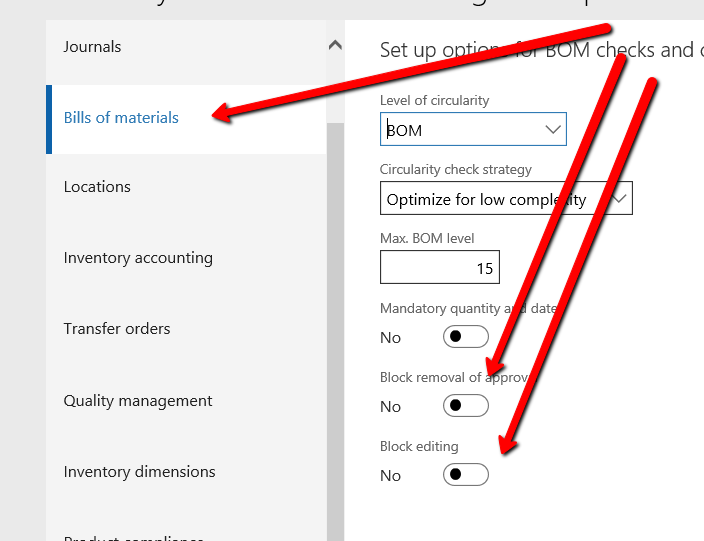
On the Business requirement, We can stop editing functionality for Approved BOM Item.

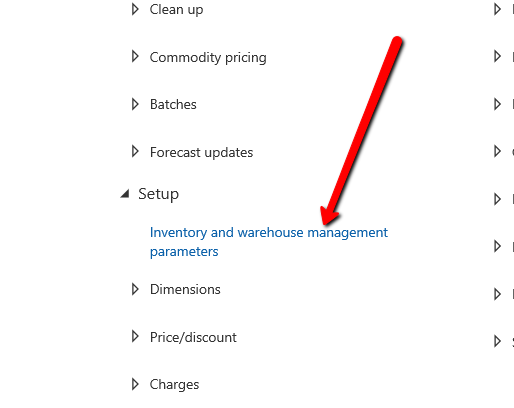
For This you have to  visit


Inventory Management and warehouse management Parameter form.


And Enable following options boxes. In Bills of materials  Block removal of approval and Block Editing.

Parameter _reportName cannot be null or empty. Dynamics Ax 2012 R3

March 19, 2018 by alirazazaidi

Hi, All, After Incremental CIL,  errors started to appear on controller classes. These are all those classes where report Name is mentioned in code. Error message in compilation as below.

Parameter _reportName cannot be null or empty.

When we compiled respected class, This error move to next controller class. After compiling number of classes. Finally We decided to compile the all classes by right click on Classes node of AOT.

Compilation of all classes in AX resolved the issue.


Purchase order Preparation Workspace In D365 for finance and operations

March 17, 2018 by alirazazaidi

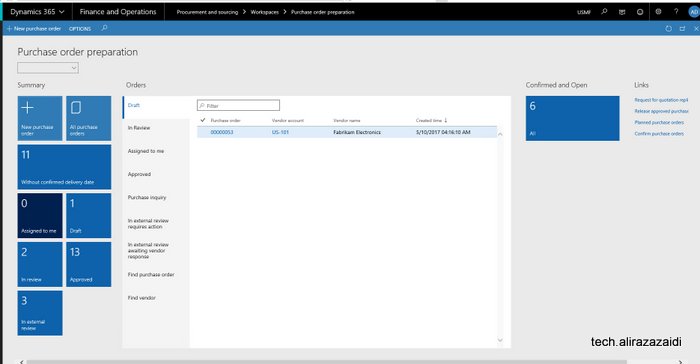
Dynamics 365 for Finance and operations has amazing feature of Workspaces. Workspace contains all possible option related to one task. For example if we  explore  “Purchase Order Preparation” Workspace in “Procurement and sourcing” module. You find all options related to Purchase order.


Here workspaces divided into three section. Summary section, tabbed detail section and related link. If you access workspaces on Cloud. Certainly you will find here power BI section. With different Bars and Charts. I using Dynamics 365 for finance and operations on dev box on my laptop. So this feature is not enabled


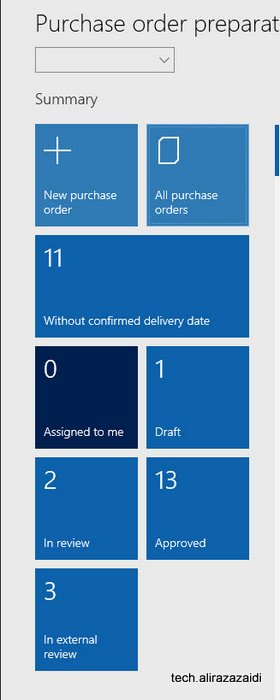
If we see Summary section.  It will leads us to New purchase order screen, All Purchase Orders, And some other status, that  orders without Confirm Delivery Date. Approved and review or external review.


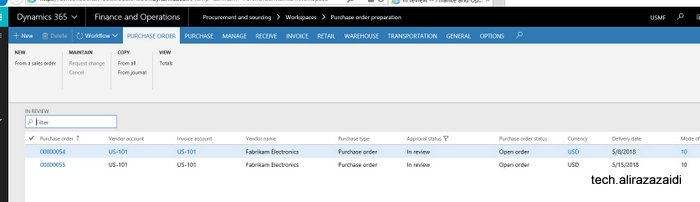
If we click any one of Summary boxes, these leads us to list pages. For example I clicked on in review box.  This will leads to list page and detail of in review records are shown there.


If we click on All purchase orders, this leads us to list page, for example If I click on in review purchase orders. This will leads us to page these two in review records are showing.


If We can see Workspace in detail, we found some tab, which shows the similar details. It is powerful and light weight feature. There are multiple grids and it load data in a few seconds.


Here I found two workflow related tabs . For example purchase order assigned to current user can be shown in “Assign to me” screen.


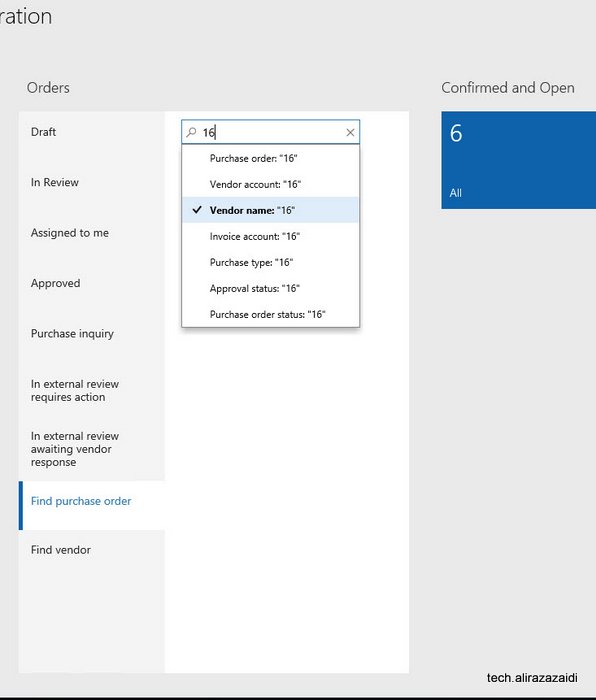
This workspace concept is amazing,  It contains Inquiries , and list page on single list. For example you can search Purchase order in drop down.


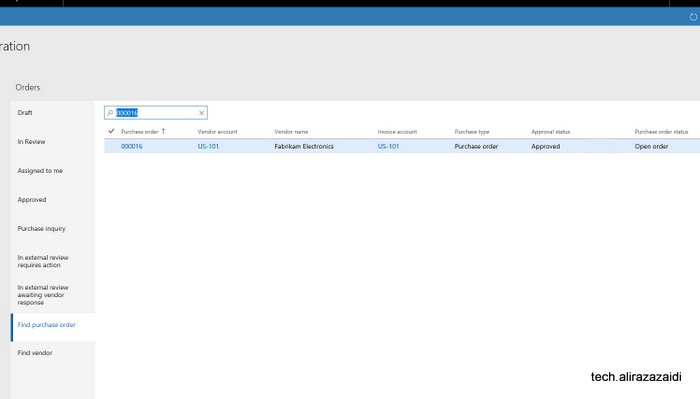
And Search result is here.

Sales Quotations Dynamics 365 for Finance and operations.

February 28, 2018 by alirazazaidi

In response to Customer/ prospect  request for quotation. Sale and marketing department generate Sales Quotations.


This Sales quotation can be generate existing customer. Otherwise D365 OF provide functionality to  register sales Quotation against Prospect.


When Customer Response against Sales Quotation, We can confirm Sales Quotation convert to Sales Sale order and Prospect convert to Customer.


Similar to Sales order , Sale quotation is added in lines section.  When entry is complete, from top menu and sent Sales quotation, Print can be generated.


There are multiple options available against Sales Quotations as response. We can find these options are available on “follow up” top tab menu.


Confirm:, Customer send confirmation so Sales Quotation convert to into Sales Order.


Cancel:  Sales Quotations can be cancel, possible there will be no response form Prospect.


Lost quotation:  In the case of another company won the quotation we can set as Lost.  It is some kind of cancel. After that quotation is closed for edit.


Two options also found in sales and marketing parameter form.


You find in General tab


Days campaign  expire, means sales quotation automatic expire the create of sales quotation.

Sales follow up date automatically created quotation creation date plus date mentioned here.

Sales follow up means, date of sales Quotation is created plus days mentioned here in setup.

« Previous Page
Next Page »

Primary Sidebar

About

I am Dynamics AX/365 Finance and Operations consultant with years of implementation experience. I has helped several businesses implement and succeed with Dynamics AX/365 Finance and Operations. The goal of this website is to share insights, tips, and tricks to help end users and IT professionals.

Legal

Content published on this website are opinions, insights, tips, and tricks we have gained from years of Dynamics consulting and may not represent the opinions or views of any current or past employer. Any changes to an ERP system should be thoroughly tested before implementation.

Categories

  • Accounts Payable (2)
  • Advance Warehouse (2)
  • AI (3)
  • Asset Management (3)
  • Azure Functions (1)
  • Books (6)
  • Certification Guide (3)
  • ChatGPT (3)
  • Claude (1)
  • Customization Tips for D365 for Finance and Operations (63)
  • D365OF (60)
  • Data Management (1)
  • database restore (1)
  • Dynamics 365 (59)
  • Dynamics 365 for finance and operations (139)
  • Dynamics 365 for Operations (174)
  • Dynamics AX (AX 7) (134)
  • Dynamics AX 2012 (274)
  • Dynamics Ax 2012 Forms (13)
  • Dynamics Ax 2012 functional side (16)
  • Dynamics Ax 2012 Reporting SSRS Reports. (31)
  • Dynamics Ax 2012 Technical Side (52)
  • Dynamics Ax 7 (65)
  • Exam MB-330: Microsoft Dynamics 365 Supply Chain Management (7)
  • Excel Addin (1)
  • Favorites (12)
  • Financial Modules (6)
  • Functional (8)
  • General Journal (1)
  • Implementations (1)
  • Ledger (1)
  • Lifecycle Services (1)
  • Logseq (4)
  • Management Reporter (1)
  • Microsoft Excel (4)
  • MS Dynamics Ax 7 (64)
  • MVP summit (1)
  • MVP summit 2016 (1)
  • New Dynamics Ax (19)
  • Non Defined (9)
  • Note taking Apps (2)
  • Obsidian (4)
  • Personal Knowledge Management (3)
  • PKM (16)
  • Power Platform (6)
  • Procurement (5)
  • procurement and sourcing (6)
  • Product Information Management (4)
  • Product Management (6)
  • Production Control D365 for Finance and Operations (10)
  • Sale Order Process (10)
  • Sale Order Processing (10)
  • Sales and Distribution (5)
  • Soft Skill (1)
  • Supply Chain Management D365 F&O (5)
  • Tips and tricks (278)
  • Uncategorized (165)
  • Upgrade (1)
  • Web Cast (7)
  • White papers (4)
  • X++ (10)

Wiki

  • SCM

Copyright © 2026 · Magazine Pro On Genesis Framework · WordPress · Log in