
• Skip to main content
  • Skip to primary sidebar
  • Home
  • About
  • Recommended Readings
    • 2022 Book Reading
    • 2023 Recommended Readings
    • Book Reading 2024
    • Book Reading 2025
    • Book Reading 2026
  • Supply Chain Management Guide
  • PKM
  • Microsoft Excel
  • Microsoft Copilot in Office 365
  • Public Wiki Page

Ali Raza Zaidi

A practitioner’s musings on Dynamics 365 Finance and Operations

Dynamics Ax 2012 Forms

How to Use AX Form As lookup in Dynamics Ax 2012

August 27, 2014 by alirazazaidi

Consider a scenario where, I required a StringEditControl and Clicking on Control a lookup is open where the list of Customer of selected Legal Entity are available. And After Selecting required Customer, Customer Id Or AccountNum is return form Lookup form.


For This purpose we have to create form, which will used as look Up.


Create a New form. Name It  “FormCustomerLookUp”

New Form

In Data Source Create and New dataSource Name It CustomerTable and Point to CustTable.


Customer Table As DataSource

Expand the Design node  and Right Click on It and Add Grid, Now from CustomerTable Data Source, Drag and drop “AccountNum” and “Party” on Grid. It will create two String Edit Control on Grid bound with CustomerTable.


CustomerFields

Now Select on “StringEdit:CustomerTable_AccountNum” select Properties. Form Properties window Set Its Auto declaration  property to True.


LookUpFieldAutoProperties

Now expend the Methods Node form and Right click and override the Init method from there and add following line of code there.


    element.selectMode(CustomerTable_AccountNum);


LookUpFormInitialization


Now right click on Design Node and Update following properties.

Width=360

Style=LookUP.

StyleToLookUp


Now Create a form where this lookup will use. For this Article I have to create very simple form with only on stringEdit textbox.

On its Design Right click and create StringEditButton with Name “LookUpTest” and from Its property window Auto Declare Property is set to Yes and lookupButton property to “Always”.


TargetFieldProperties


LookUpFields


Now Add two method, One used to Register control with Lookup, and Second method will use to call lookup form and gets its value.

protected void configureCustomerLookUp(FormStringControl stringControl)

{

if (stringControl)

{


stringControl.visible(true);

stringControl.registerOverrideMethod(

methodStr(FormStringControl, lookup),

identifierStr(CustomerLookUp), this);


}

}

LookupRegisteration


Second method will be called on lookup button click


private void CustomerLookUp(FormStringControl stringControl)

{

Args args = new Args(identifierStr(FormCustomerLookUp));

FormRun lookupFormRun;


args.parm(“”);

args.caller(this);


lookupFormRun = ClassFactory::formRunClassOnClient(args);

lookupFormRun.init();


stringControl.performFormLookup(lookupFormRun);

lookupFormRun.wait();


}

LookUpMethods

If you have already some knowledge above code is easily Understanable, where  Ax form Name set in args and instance of from is created at runtime and then attached the form to string controls performLookUp method.


Now run the form. And click on lookup button on textbox.

TargetButtonForm


Click on LookUp Button


LookUpClick

Selected Value will show on text box when you click on lookup grid


SelectedValueInTarget


Nice Experiments, Now you can use This functionality as you want,
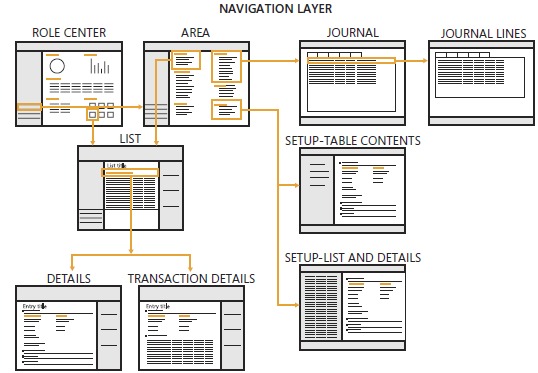


Exploring the Navigation layout of Dynamics Ax 2012

May 9, 2014 by alirazazaidi

7711.image_06B8A9D3

Above picture is taken from following link

http://blogs.msdn.com/b/microsoft_press/archive/2012/10/25/new-book-inside-microsoft-dynamics-ax-2012.aspx

Role center is user page; appear on opening at Dynamics Ax. The role center is depending on rights and role of user. Role center provide dashboards, which helps to user to monitor their roles. This information includes transaction data, alerts, links and common tasks that are associated with user’s role.

6443.CFO Role Center with Power View Map.JPG-550x0


Another example of Role center:

Role Center


Area Page. Area page is the main page of Every Module.

06-Area Page With Detail


Every area page have link to, List page, Journal, Reports, Setup table list, Inquiries and Periodic page.

  • By Default 20 area page exists for dynamics Ax.
  • Each Area page focus on one complete module or area, for example Account receivable, Account payable, cost accounting and Administration.


05-Area Page

Common or list pages. These links leads you to list page of any Entities in that module. For example in Account receivable module contains customer list page. Through list page user is able to Navigate every part of data related to that entity.


07-CustomerListPage Customer List Page with data


Detail From: Detail forms are primary way to create or update entities in Dynamics Ax like customer Vendor, worker and products. These detail forms can be open by click on list page.  By default these pages are open in read only mode. You have to click edit button to open in detail page.

01-Detail Page


Transaction detail Forms.

Transaction detail forms are forms that are used to create, update transaction in Microsoft Dynamics Ax.

Traction is business event that occurs with in company that needs to be recorded in ERP system.

Transaction detail forms have to divided two parts one is Line view and Header view.


: This shows a few header level fields which are required for transaction. This default view and items are added here.

02-LineView


Header View:

This contains all most all fields at header view. Most of fields have default values and required to modify here.

03-Header View


Journal: These pages link to all related which have some functional or finance related information.

08-Journal


Periodic:

All those page which will periodically access by user example

Payment fee.

09-Periodic


Different Sections of Dynamics Ax 2012 forms

April 27, 2014 by alirazazaidi

Dynamics Ax forms is divided into different section. Pictures worth thousand words.


1-Forms Section


2-Tabs

« Previous Page

Primary Sidebar

About

I am Dynamics AX/365 Finance and Operations consultant with years of implementation experience. I has helped several businesses implement and succeed with Dynamics AX/365 Finance and Operations. The goal of this website is to share insights, tips, and tricks to help end users and IT professionals.

Legal

Content published on this website are opinions, insights, tips, and tricks we have gained from years of Dynamics consulting and may not represent the opinions or views of any current or past employer. Any changes to an ERP system should be thoroughly tested before implementation.

Categories

  • Accounts Payable (2)
  • Advance Warehouse (2)
  • AI (3)
  • Asset Management (3)
  • Azure Functions (1)
  • Books (6)
  • Certification Guide (3)
  • ChatGPT (3)
  • Claude (1)
  • Customization Tips for D365 for Finance and Operations (64)
  • D365OF (60)
  • Data Management (1)
  • database restore (1)
  • Dynamics 365 (59)
  • Dynamics 365 for finance and operations (139)
  • Dynamics 365 for Operations (175)
  • Dynamics AX (AX 7) (134)
  • Dynamics AX 2012 (274)
  • Dynamics Ax 2012 Forms (13)
  • Dynamics Ax 2012 functional side (16)
  • Dynamics Ax 2012 Reporting SSRS Reports. (31)
  • Dynamics Ax 2012 Technical Side (52)
  • Dynamics Ax 7 (65)
  • Exam MB-330: Microsoft Dynamics 365 Supply Chain Management (7)
  • Excel Addin (1)
  • Favorites (12)
  • Financial Modules (6)
  • Functional (8)
  • General Journal (1)
  • Implementations (1)
  • Ledger (1)
  • Lifecycle Services (1)
  • Logseq (4)
  • Management Reporter (1)
  • Microsoft Excel (4)
  • MS Dynamics Ax 7 (64)
  • MVP summit (1)
  • MVP summit 2016 (1)
  • New Dynamics Ax (19)
  • Non Defined (9)
  • Note taking Apps (2)
  • Obsidian (4)
  • Personal Knowledge Management (3)
  • PKM (16)
  • Power Platform (6)
  • Procurement (5)
  • procurement and sourcing (6)
  • Product Information Management (4)
  • Product Management (6)
  • Production Control D365 for Finance and Operations (10)
  • Sale Order Process (10)
  • Sale Order Processing (10)
  • Sales and Distribution (5)
  • Soft Skill (1)
  • Supply Chain Management D365 F&O (5)
  • Tips and tricks (278)
  • Uncategorized (165)
  • Upgrade (1)
  • Web Cast (7)
  • White papers (4)
  • X++ (10)

Wiki

  • SCM

Copyright © 2026 · Magazine Pro On Genesis Framework · WordPress · Log in