• Skip to main content
  • Skip to primary sidebar
  • Home
  • About
  • Recommended Readings
    • 2022 Book Reading
    • 2023 Recommended Readings
    • Book Reading 2024
    • Book Reading 2025
    • Book Reading 2026
  • Supply Chain Management Guide
  • PKM
  • Microsoft Excel
  • Microsoft Copilot in Office 365
  • Public Wiki Page

Ali Raza Zaidi

A practitioner’s musings on Dynamics 365 Finance and Operations

Dynamics Ax 7

Drill through SSRS – Dynamics 365 for Finance and Operations

April 19, 2018 by alirazazaidi

Helped a junior, build a small SSRS expression, who build hyperlink to Course page on SSRS. You can modify it with respect your need.


=Microsoft.Dynamics.Framework.Reports.BuiltInMethods.GenerateDrillThroughLink( Parameters!AX_ReportContext.Value, Parameters!AX_UserContext.Value, “HRMCourseTable”, “Display”, “HRMCourseTable”, “hrmCourseId”, Fields!hrmCourseId.Value)

Vendor On board in D365 for Finance and operations -A Microsoft Video

April 15, 2018 by alirazazaidi

Sales Quotations Dynamics 365 for Finance and operations.

February 28, 2018 by alirazazaidi

In response to Customer/ prospect  request for quotation. Sale and marketing department generate Sales Quotations.


This Sales quotation can be generate existing customer. Otherwise D365 OF provide functionality to  register sales Quotation against Prospect.


When Customer Response against Sales Quotation, We can confirm Sales Quotation convert to Sales Sale order and Prospect convert to Customer.


Similar to Sales order , Sale quotation is added in lines section.  When entry is complete, from top menu and sent Sales quotation, Print can be generated.


There are multiple options available against Sales Quotations as response. We can find these options are available on “follow up” top tab menu.


Confirm:, Customer send confirmation so Sales Quotation convert to into Sales Order.


Cancel:  Sales Quotations can be cancel, possible there will be no response form Prospect.


Lost quotation:  In the case of another company won the quotation we can set as Lost.  It is some kind of cancel. After that quotation is closed for edit.


Two options also found in sales and marketing parameter form.


You find in General tab


Days campaign  expire, means sales quotation automatic expire the create of sales quotation.

Sales follow up date automatically created quotation creation date plus date mentioned here.

Sales follow up means, date of sales Quotation is created plus days mentioned here in setup.

Customer / Vendor ledger Dimension D365 for finance and operations X++

February 28, 2018 by alirazazaidi


In D365 for finance things are little bit change and much more organized. In Dynamics Ax 2012, which consider as classic AX. We get ledger dimension  with DimensionStorage class


ledgerDim = DimensionStorage::getDynamicAccount(

‘US-001’,

LedgerJournalACType::Cust);//Account

offsetLedgerDim = DimensionStorage::getDynamicAccount(

‘USMF OPER’,

LedgerJournalACType::Bank);//OffsetAccount


In D365 this Microsoft provide LedgerDynamicAccountHelper. Code snippet is here


ledgerDim = LedgerDynamicAccountHelper:

:getDynamicAccountFromAccountNumber(‘US-1001’,

LedgerJournalACType::Cust);


offsetLedgerDim = LedgerDynamicAccountHelper:

:getDynamicAccountFromAccountNumber(

‘USMF OPER’,

LedgerJournalACType::Bank);


Reference http://daxingwitheshant.blogspot.com/2015/04/creating-payment-journal-using-x-in-ax.html

Microsoft Connect portal retired, you have to follow other link

February 9, 2018 by alirazazaidi


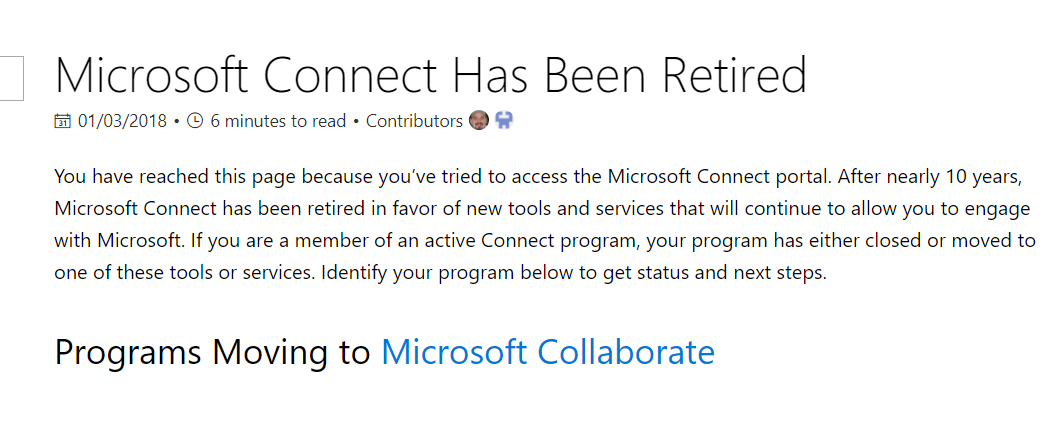
Hi all, I was trying to download latest Dynamics 365 for finance Dev box vm, but found that Microsoft Connect portal is retired. you can found all information here.

https://docs.microsoft.com/en-us/collaborate/connect-redirect


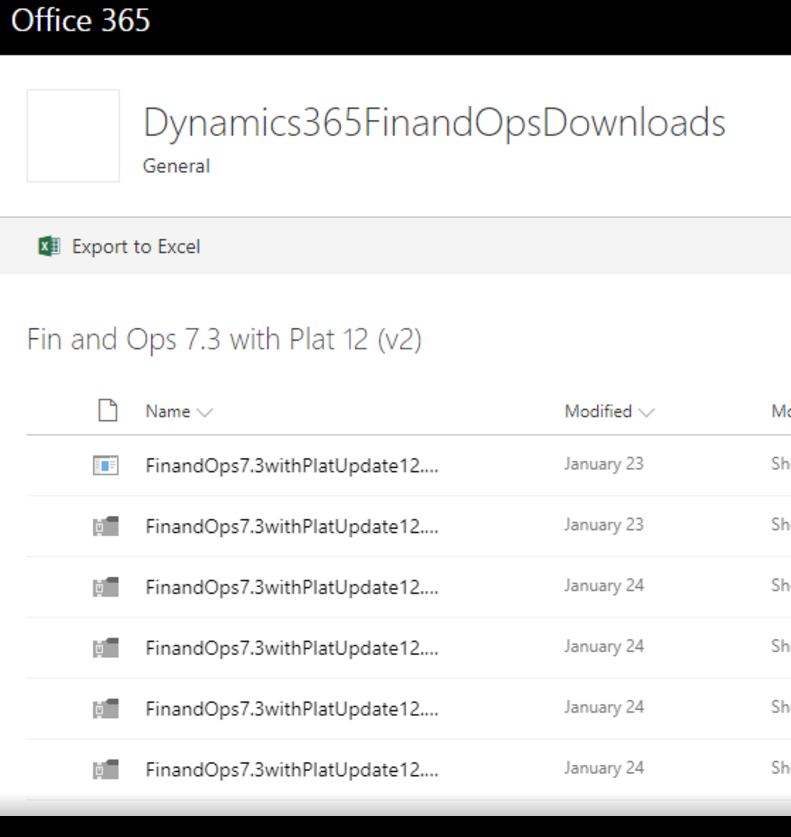
I expect that lastest VM link will available here, As I found latest 7.3 update 12 link here

https://aka.ms/finandops73pu12


And it leads us to some share point link, Download is good as compare to old connect link.


MetaData Search D365 for Finance and Operations.

February 5, 2018 by alirazazaidi

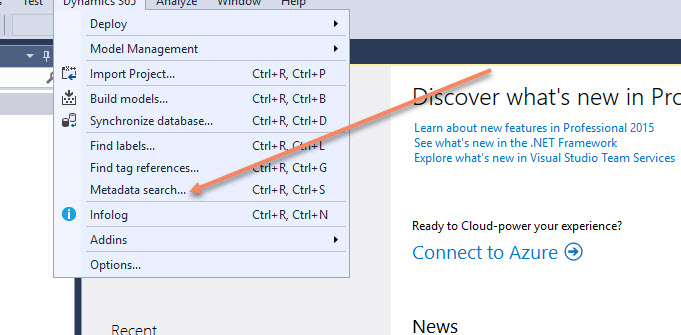
I was exploring Visual Studio Menu Dynamics 365 . I found Meta Data Search sub menu. Microsoft Has very nice article on this.

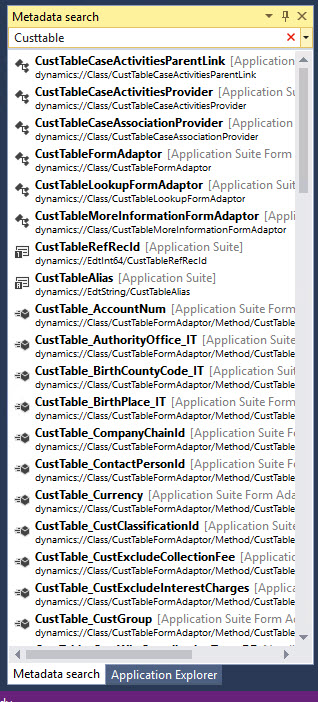
It is very good tool to search code reference in AOT.  Suppose I search CustTable reference In AOT. The result is as follow


Reference : https://docs.microsoft.com/en-us/dynamics365/unified-operations/dev-itpro/dev-tools/metadata-search-visual-studio


Process Busy Indicator D365 for finance and operations

January 25, 2018 by alirazazaidi

Hi All, today I have small tip, During development, I have to process a lot of records. During this , I need Busy screen process indicator.


I used following code snippet to create progress busy indicator.


For this I have to do following changes in my Class method (Business logic).

  1. Convert required method to Static
  2. Parameter is changed to Container and then required parameter extract from container inside the method.


So my required method become something like


Class myProcess

{


Public static void RunmyProcess(Container _C)

{

Str _Value = conpeek(_C,1);


}


}


class RunBtnProcess

{

/// <summary>

///

/// </summary>

public void clicked()

{


container _Xyz=[TableName.FieldValue];

super();

SysOperationSandbox::callStaticMethod(classNum(myProcess),
staticMethodStr(myProcess,RunmyProcess),_Xyz, 
'Ledger Record in process', 'Operation completed');


}


}

Reference : Internet.

Parent child form Customization D365 for Finance and Operations

January 21, 2018 by alirazazaidi

Today I just noted down a very simple parent child form customization in D365 for Finance and operations.


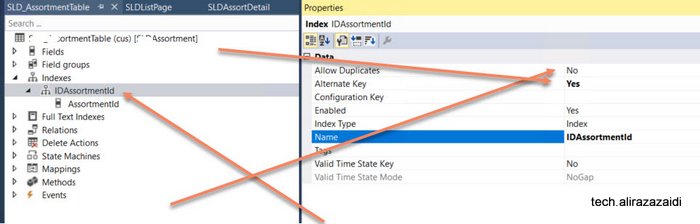
First step is to create a primary key or alternative key  For this create a Index

and set Alternative key true and Allow duplicate set to no.


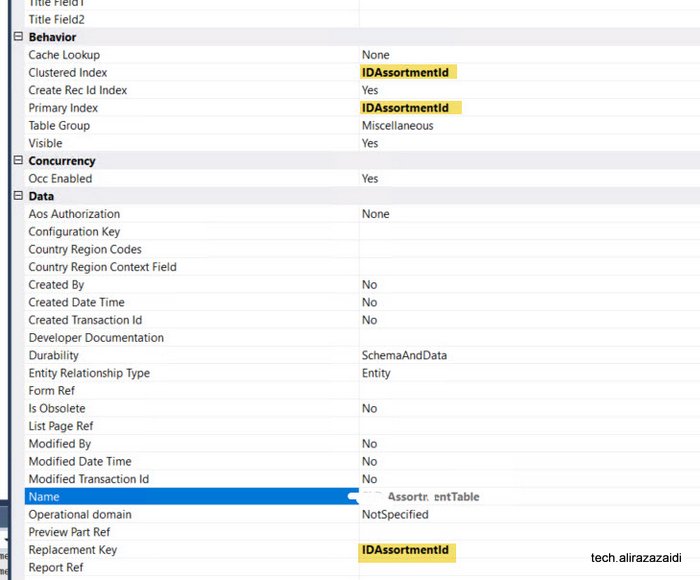
Next step expand the table Property and set following properties. With newly created Index.


As different to Dynamics Ax 2012. Reference field you have to manually created in child table.


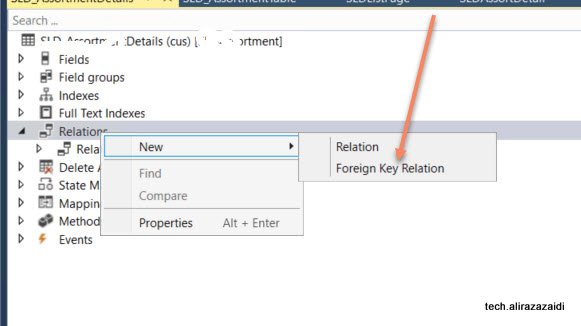
Now expand relationship node of child and right click and add relation


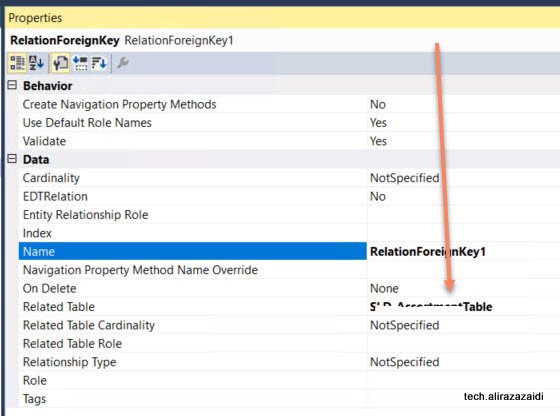
Relationship property window set table


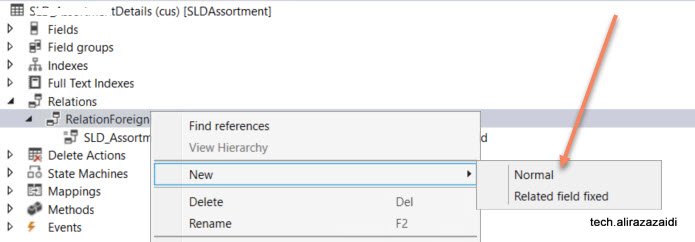
Now relight click on it and add normal relationship


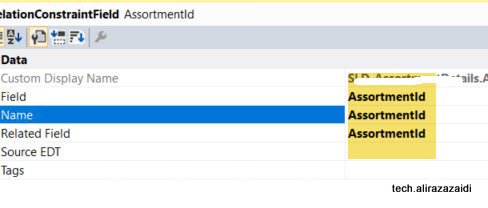
Set new  both side of required field.


Table relation is complete.


As I am fan of old style Dynamics Ax 2012 Style development So I made Customization similar to that.

There are multiple way to build parent child forms, with a new form Patterns of D365 for Finance and operations


For Detail page. Add new form in your project and did not select any form pattern.


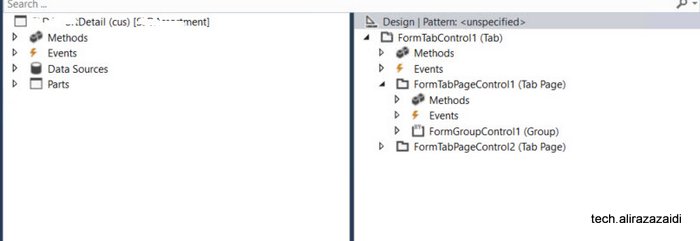
Then add Tab control and add two tab pages, one for Parent and one for child


Set tab control style property to FastTabs.


Now add both Tables in data source of form.


Set Join Source of child table set parent table


Now Drag required fields in group in parent area.


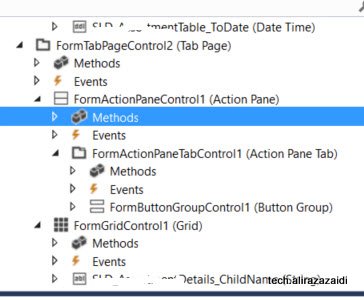
Now in child tab page, Add action pane, Action Tab control ,Button group and add three command buttons with Name add, edit and delete also set their command  type respectively.


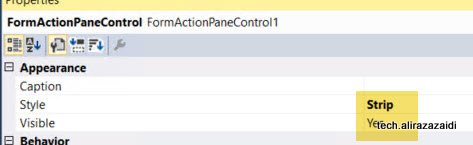
Also set action tab as Strip.


Also Set Button group data source property to child data source so Add, edit and Delete works on child table.


Now Add grid below action tab and Set its data source to child data source.


Also drag child table fields under the grid.


Tab page structure look like similar.


Now click on tab Design and  Set its data source to Parent Table, so out of the box button on form works for parent table.


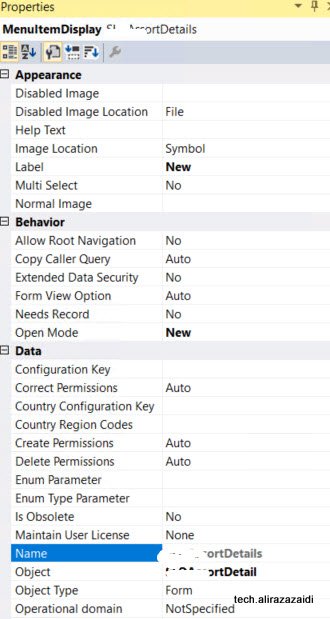
Now create three display menu and set one for Edit, one for View and Add new also set object property to detail form.


Like this. For new  set open mode to new and Set form in object


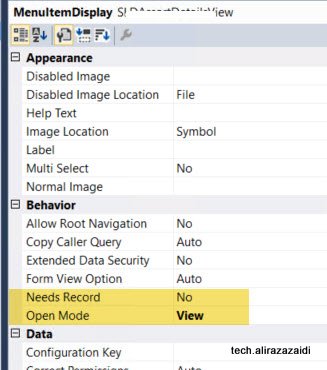
Similar edit menu, View menus the difference is open mode.


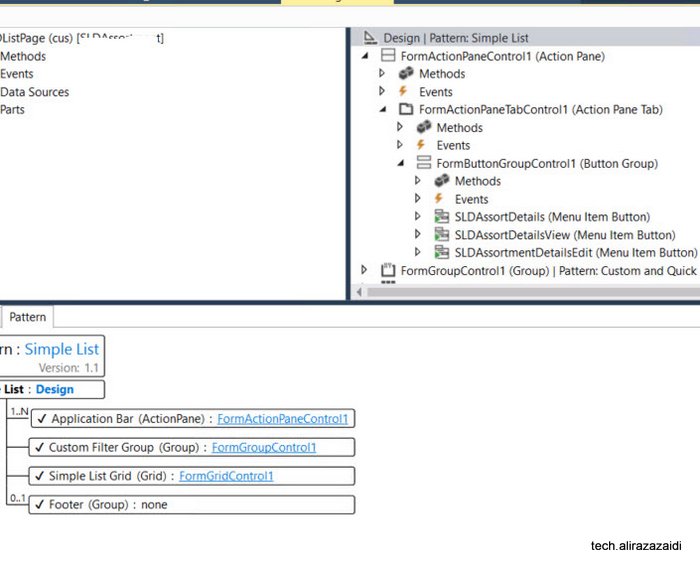
Now create a new form and a form and apply simple list pattern.

Also resolve pattern requirement, by adding Grid, Action Pane, and Group, Apply pattern on and then add Search

Like follow


Now drag three display menu drag them in Button group on List page’s action pane.


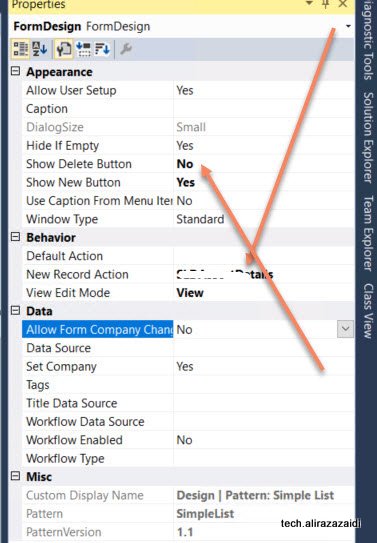
Right click Design and from properties  set New Record Action property to menu button of Action pane so on click on new button redirect to child page in new mode.


And set the


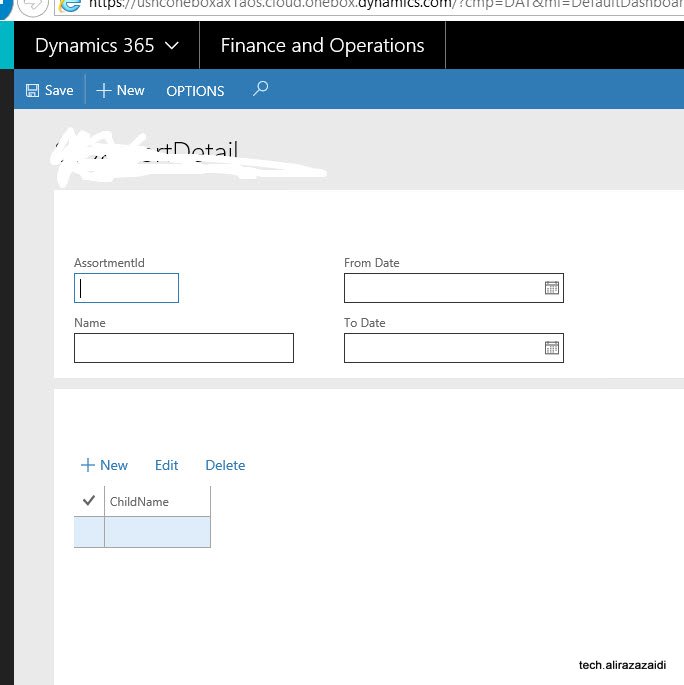
Let see the out put


If we click on new button, it will leads us to child page for create new, edit and delete records


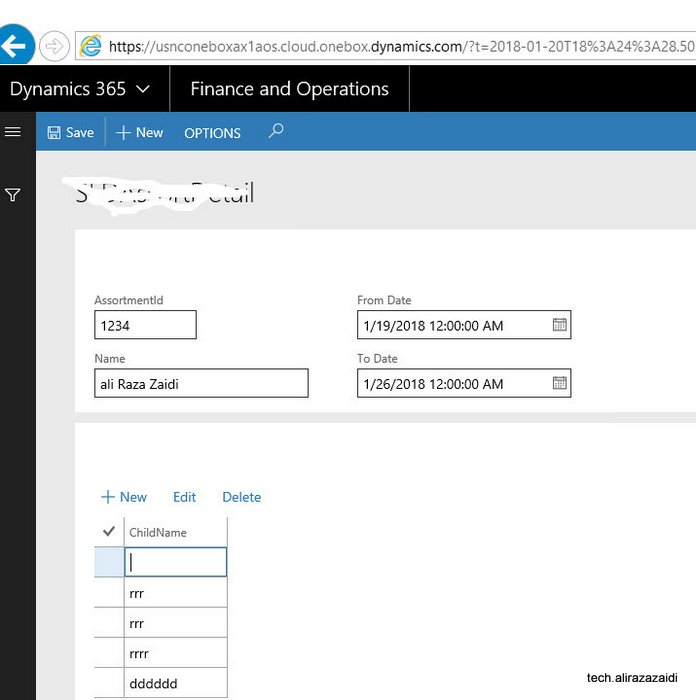
On Clicking on link this will leads to detail page for selected record, which where we can add entries for child records.


How to apply application hot fix on Dynamics 365 for finance and operations

January 19, 2018 by alirazazaidi

Hi a couple of days ago, I got chance to apply application hot fixes required to apply on cloud dev environment.

So I made this very short post.


First Step:

Check in all changes in TFS and make sure no error in AOT.


Second step:


You need to download hot fix from LCS.


Third Step:

To download vm RDP file and credential from LCS and login in VM.


Fourth step:


Open visual studio with run as admin.


Then from Dynamics 365 menu click on addins and from contex menu click on hot fix.


fifth Step:


Extract the zip file and extract the hot fix file and load into dialog. Also set TFS settings.


Apply And in couple of second patch is applied


Sixth Step:


After path applied, Synchronization database from Dynamics 365 menu.


Seventh Step:

Check all compile model, Make sure that all models are check in.


Eighth Step:


Resolve error in the case errors occurs,

In my case no error occurs.


9th step:


Check in everything into TFS with hot fix name in comments.

Manually deploy all reports on a D365 for Finance and operations one box

January 15, 2018 by alirazazaidi

Run power shell as an admin and run below command (change path if needed) J:\AosService\PackagesLocalDirectory\Plugins\AxReportVmRoleStartupTask\DeployAllReportsToSSRS.ps1 -PackageInstallLocation “J:\AosService\PackagesLocalDirectory”


Reference:

« Previous Page
Next Page »

Primary Sidebar

About

I am Dynamics AX/365 Finance and Operations consultant with years of implementation experience. I has helped several businesses implement and succeed with Dynamics AX/365 Finance and Operations. The goal of this website is to share insights, tips, and tricks to help end users and IT professionals.

Legal

Content published on this website are opinions, insights, tips, and tricks we have gained from years of Dynamics consulting and may not represent the opinions or views of any current or past employer. Any changes to an ERP system should be thoroughly tested before implementation.

Categories

  • Accounts Payable (2)
  • Advance Warehouse (2)
  • AI (3)
  • Asset Management (3)
  • Azure Functions (1)
  • Books (6)
  • Certification Guide (3)
  • ChatGPT (3)
  • Claude (1)
  • Customization Tips for D365 for Finance and Operations (64)
  • D365OF (60)
  • Data Management (1)
  • database restore (1)
  • Dynamics 365 (59)
  • Dynamics 365 for finance and operations (139)
  • Dynamics 365 for Operations (175)
  • Dynamics AX (AX 7) (134)
  • Dynamics AX 2012 (274)
  • Dynamics Ax 2012 Forms (13)
  • Dynamics Ax 2012 functional side (16)
  • Dynamics Ax 2012 Reporting SSRS Reports. (31)
  • Dynamics Ax 2012 Technical Side (52)
  • Dynamics Ax 7 (65)
  • Exam MB-330: Microsoft Dynamics 365 Supply Chain Management (7)
  • Excel Addin (1)
  • Favorites (12)
  • Financial Modules (6)
  • Functional (8)
  • General Journal (1)
  • Implementations (1)
  • Ledger (1)
  • Lifecycle Services (1)
  • Logseq (4)
  • Management Reporter (1)
  • Microsoft Excel (4)
  • MS Dynamics Ax 7 (64)
  • MVP summit (1)
  • MVP summit 2016 (1)
  • New Dynamics Ax (19)
  • Non Defined (9)
  • Note taking Apps (2)
  • Obsidian (4)
  • Personal Knowledge Management (3)
  • PKM (16)
  • Power Platform (6)
  • Procurement (5)
  • procurement and sourcing (6)
  • Product Information Management (4)
  • Product Management (6)
  • Production Control D365 for Finance and Operations (10)
  • Sale Order Process (10)
  • Sale Order Processing (10)
  • Sales and Distribution (5)
  • Soft Skill (1)
  • Supply Chain Management D365 F&O (5)
  • Tips and tricks (278)
  • Uncategorized (165)
  • Upgrade (1)
  • Web Cast (7)
  • White papers (4)
  • X++ (10)

Wiki

  • SCM

Copyright © 2026 · Magazine Pro On Genesis Framework · WordPress · Log in