• Skip to main content
  • Skip to primary sidebar
  • Home
  • About
  • Recommended Readings
    • 2022 Book Reading
    • 2023 Recommended Readings
    • Book Reading 2024
    • Book Reading 2025
  • Supply Chain Management Guide
  • PKM
  • Microsoft Excel
  • Microsoft Copilot in Office 365
  • Public Wiki Page

Ali Raza Zaidi

A practitioner’s musings on Dynamics 365 Finance and Operations

Dynamics Ax 2012 functional side

Vendor Reasons Lookup

October 12, 2014 by alirazazaidi

In Dynamics Ax 2012, you can create Vendor Reasons, These reasons helps to describe codes used to against the vendor, vendor transaction and vendor task. A reason code is used to justify the why change or transaction occurs.

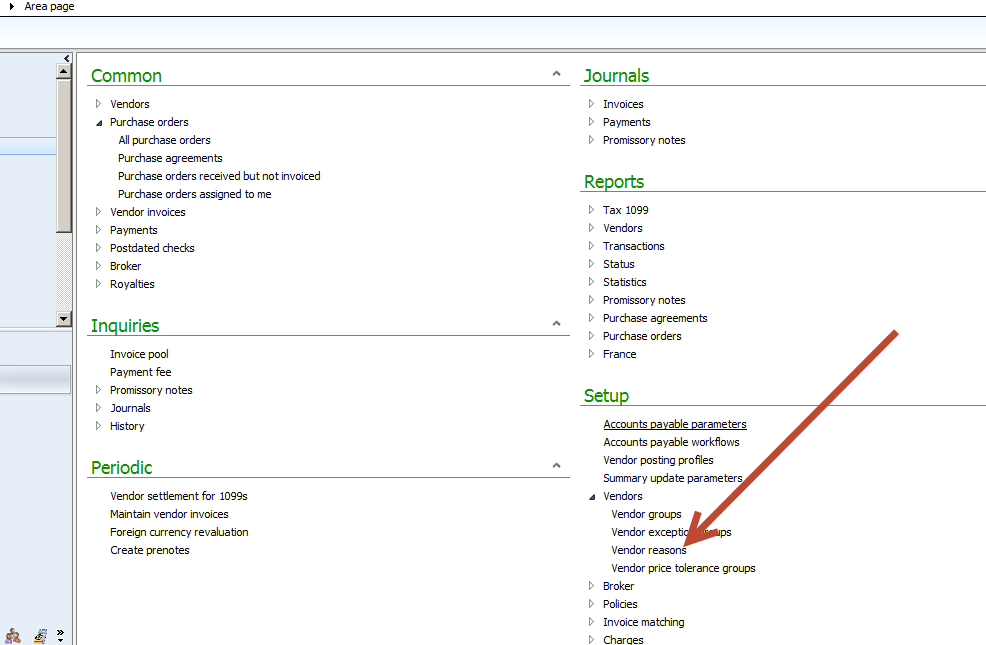
You can find Vendor reasons in Account Reasonable Area Page.

10-12-2014 11-10-47 AM


You can add vendor reason from Vendor Reason Form


VendorReason


If you go AOT you find that Data store in ReasonTable

Exploring the Functional Side of Dynamics Ax 2012: How to create Legal entity.

January 20, 2014 by alirazazaidi

Today I decide to start Exploring the functional side of Dynamics AX 2012. The starting point certainly to create legal entity and explore the further options.

To Create a legal entity you have to open the legal entity form by the following link

  • Organizational Administrationè ==>Organization==>Legal Entities.01-legalEntitylink
  • To create a new legal entity click on new button and start enter the information. For example, in my case I am going to create a legal entity with Name “Lahore” and with company Name “Systems Ltd.” 02-New Legal Entity
  • After entering information of Legal entity Name, Organization Name and region area Name press on ok button to save it.03-New Legal Entity Save
  • Newly created Legal entity is shown in right side bar as follow.04-newlyCreated LegalEntity shown
  •  From right side window I can update further detail information for legal entity. There are following fast tabs are on the form

05-FastTabs 05-FastTabs


From General Tabs You can update following important information for legal entity

  • Language.
  • Search Name
  • Time Zone.

06-General Tab


Address Fast Tab:

From Address Fast tab: you can address information.

07-Address Fast tab


Click on Add button or Click on Edit button you can find more options.

08-Detail Address new


You can add Contact information from Contact fast There

There are 4 types of contact you can create

  • Phone Number
  • Email Address
  • URL
  • Telex
  • Fax.
  • If there are many contact number, you can make one of them primary by clicking check box on grid.09-Contact tab
  • From Tax Registration fast tab you can enter information regarding Taxation. Because Dynamics Ax is one of big ERP. It also option of Zakat.

10-Tax registration.


From Tax 1099 you can enter withholding tax information.

11-Tax1099


Statutory reporting fast tab, you can enter the registration information which will be used for statutory reporting.

12-Statutory reporting

12-Statutory reporting

Banking information can be add Banking information fast tab.
13-Banking information

Foreign trade and logistics Fast tab you can address shipment address

14-Foreign trade and logistics

If there is any Sequence number associated with legal entity that can be shown from here.

15-Sequence Number

reference : http://technet.microsoft.com/en-us/library/hh242184.aspx

Dynamics Ax 2012: Configuration of basic Setup or basic company data in Dynamics Ax 2012

November 4, 2013 by alirazazaidi

Recently I made a new Virtual machine for dynamics Ax 2012. The issue was the VM was clean, no legal entity and no step up data present in it. Purpose of making this virtual machine is to study functional side of dynamics Ax 2012. On Searching start up data, I found excellent article by MVP Murray Fife.

Murray Fife identity following steps for configuration of dynamics Ax 2012
Configuring the Legal Entity:
This is require for Legal entity, form which everything will operate. In my Case it will be Lahore 01 i.e. lh01 Legal entity.
Configuring a Business Unit:
For ledger it is a better to create a new business unit for Legal Entity.
Configuring Account Structures:
Account structure will be required to post new company ledger from within the organization.
Configuring Company Ledger:
After configuration of account structure, company ledger will link to this structure and define the Account codes.
Configuring Automatic Transaction Accounts:
There is requirement of auto transaction accounts at organization level.
Creating a Bank Account:
Last step is configuration of Default Bank Account.

The complete article by MVP Murray Fife.

Configuring a Basic Company in Dynamics AX

Primary Sidebar

About

I am Dynamics AX/365 Finance and Operations consultant with years of implementation experience. I has helped several businesses implement and succeed with Dynamics AX/365 Finance and Operations. The goal of this website is to share insights, tips, and tricks to help end users and IT professionals.

Legal

Content published on this website are opinions, insights, tips, and tricks we have gained from years of Dynamics consulting and may not represent the opinions or views of any current or past employer. Any changes to an ERP system should be thoroughly tested before implementation.

Categories

  • Accounts Payable (2)
  • Advance Warehouse (2)
  • Asset Management (3)
  • Azure Functions (1)
  • Books (6)
  • Certification Guide (3)
  • Customization Tips for D365 for Finance and Operations (62)
  • D365OF (60)
  • Data Management (1)
  • database restore (1)
  • Dynamics 365 (59)
  • Dynamics 365 for finance and operations (138)
  • Dynamics 365 for Operations (174)
  • Dynamics AX (AX 7) (134)
  • Dynamics AX 2012 (274)
  • Dynamics Ax 2012 Forms (13)
  • Dynamics Ax 2012 functional side (16)
  • Dynamics Ax 2012 Reporting SSRS Reports. (31)
  • Dynamics Ax 2012 Technical Side (52)
  • Dynamics Ax 7 (65)
  • Exam MB-330: Microsoft Dynamics 365 Supply Chain Management (7)
  • Excel Addin (1)
  • Favorites (12)
  • Financial Modules (6)
  • Functional (8)
  • General Journal (1)
  • Implementations (1)
  • Ledger (1)
  • Lifecycle Services (1)
  • Logseq (4)
  • Management Reporter (1)
  • Microsoft Excel (4)
  • MS Dynamics Ax 7 (64)
  • MVP summit (1)
  • MVP summit 2016 (1)
  • New Dynamics Ax (19)
  • Non Defined (9)
  • Note taking Apps (2)
  • Obsidian (4)
  • Personal Knowledge Management (3)
  • PKM (16)
  • Power Platform (6)
  • Procurement (5)
  • procurement and sourcing (6)
  • Product Information Management (4)
  • Product Management (6)
  • Production Control D365 for Finance and Operations (10)
  • Sale Order Process (10)
  • Sale Order Processing (10)
  • Sales and Distribution (5)
  • Soft Skill (1)
  • Supply Chain Management D365 F&O (4)
  • Tips and tricks (278)
  • Uncategorized (165)
  • Upgrade (1)
  • Web Cast (7)
  • White papers (4)
  • X++ (10)

Wiki

  • SCM

Copyright © 2026 · Magazine Pro On Genesis Framework · WordPress · Log in