• Skip to main content
  • Skip to primary sidebar
  • Home
  • About
  • Recommended Readings
    • 2022 Book Reading
    • 2023 Recommended Readings
    • Book Reading 2024
    • Book Reading 2025
  • Supply Chain Management Guide
  • PKM
  • Microsoft Excel
  • Microsoft Copilot in Office 365
  • Public Wiki Page

Ali Raza Zaidi

A practitioner’s musings on Dynamics 365 Finance and Operations

AIF

Custom AIF Service in Dynamics Ax 2012 R3 from Scratch.

July 29, 2015 by alirazazaidi

Today I decide to experiment with custom service. So I decided to create custom table with Name MyColorTable.


This table contains only one field Name. and made it unique with no allow duplicate on Index.

MyColorTable


If we consider custom service in Dynamics Ax 2012, it contains following objects


  • X++ Data contract class
  • X++ Service contract class
  • Service Node
  • Service Group node.


Data Contract class

So first we create Data contract class

Suppose Our data contract class name is  ColorDc


[DataContractAttribute]

class ColorDC

{

Name ColorName;

}

Now add a new method with Name ParmColorName and set its as


[ DataMemberAttribute('ColorName')]

public Name parmColorName(Name _ColorName=ColorName)

{

ColorName=_ColorName;

return ColorName;

}


Service contract class:

Now we write a Service class which contains Three method Purpose of these method to explore the require attribute for getting parameter in service method and return list from service method.

InsertColor. (This method contains single color)

InsertColorList (This method take list of colorDC as parameter).

GetColorList ( This method return list of colorDC).


[SysEntryPointAttribute(true),

AifCollectionTypeAttribute('Colorobj', Types::Class)]

public void InsertColor(ColorDC Colorobj)

{

MyColorTable _Color;

Name _Name;


_Name = Colorobj.parmColorName();


select * from _Color where _Color.Name== _Name;


if (_Color==null)

{

try

{

ttsBegin;

_Color.Name = _Name;

_Color.insert();


ttsCommit;

}

catch

{

ttsAbort;

}


}

}

In above method we add some attribute which allow this method to act as web method and attribute help us define the expected parameter for this method call.


Now we call create another method, here attributes also described method as webmethod and also method expect what type of parameter.

[DataMemberAttribute("InsertColorList"),

AifCollectionTypeAttribute("ColorList",Types::Class, classStr(ColorDC))

]

public Void InsertColorList(List ColorList )

{

ListIterator  iterator;

ListEnumerator  enumerator;

ListIterator   literator;

ColorDC       _color;


enumerator = ColorList.getEnumerator();


while(enumerator.moveNext())

{

_color= enumerator.current();

if (_color !=null)

{

this.InsertColor(_color);

}

}


}


Now get method which return all color in Ax.

[SysEntryPointAttribute(true),

AifCollectionTypeAttribute('return', Types::Class, classStr(ColorDC))]

public list GetColorList()

{

ColorDC Colorobj;

List _ColorList = new List(Types::Class);

MyColorTable  Colorbuf;

while select * from Colorbuf

{


Colorobj = new ColorDC();

Colorobj.parmColorName(Colorbuf.Name);

_ColorList.addEnd(Colorobj);

}

return _ColorList;

}

Now compile it now

Service Object:

create a service object and set Service contract class there

New Service

Expand ColorService object and Right click on Operations and click on add method, this way we can restrict which method need to expose in service or which method need not.

AddOperation

2015-07-28_6-40-49

Click on all check boxes and enabled them

Service Group:

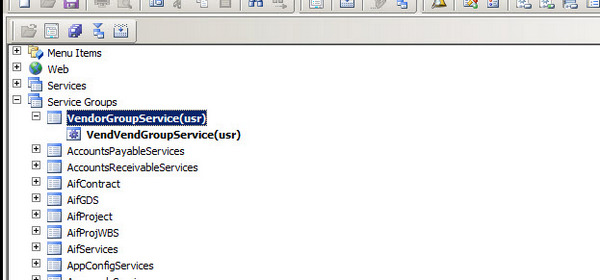
Create a new service group and drag and drop service object under it.

2015-07-28_6-41-15


Right click on ColorServiceGroup and deploy the service

Deploy


Wait and let It deploy Info box shows the message that service is deployed successfully

2015-07-28_12-38-21


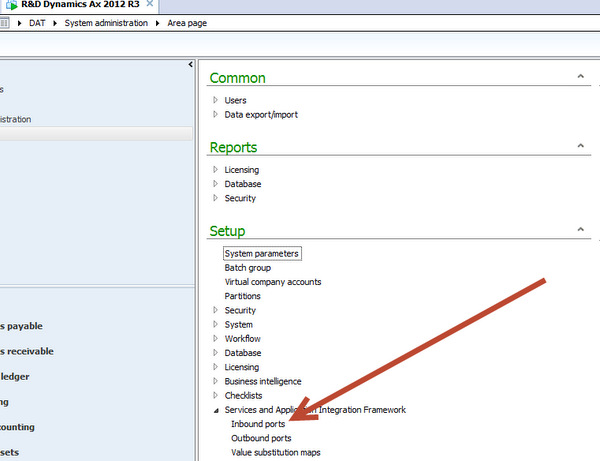
No service is successfully deployed, Now open Ax client , from Administration section. Setup=> AIF => Inbond port.

AIF

Copy WSDL URI.


Open Visual studio and create a new Console application for testing the code.

Right click on references and ad service reference

ssss


2015-07-28_13-01-06


First we call insert the records in service.


using System;

using System.Collections.Generic;

using System.Linq;

using System.Text;


namespace ConsoleApplication2

{

class Program

{

static void Main(string[] args)

{

ColorServiceGroup.ColorDC cd1 = new ColorServiceGroup.ColorDC();

cd1.ColorName = "Red";

ColorServiceGroup.ColorDC cd2 = new ColorServiceGroup.ColorDC();

cd2.ColorName = "Blue";

ColorServiceGroup.ColorDC cd3 = new ColorServiceGroup.ColorDC();

cd3.ColorName = "Yellow";


ColorServiceGroup.ColorDC[] DcList = new ColorServiceGroup.ColorDC[] { cd1, cd2, cd3 };

ColorServiceGroup.ColorServiceClient _Client = new ColorServiceGroup.ColorServiceClient();


ColorServiceGroup.CallContext _CallContext = new ColorServiceGroup.CallContext();

_CallContext.Company = "USMF";

_Client.InsertColorList(_CallContext, DcList);


}

}

}

When I run the above code in Visual studio  records are successfully inserted in original table.

TableBrowser


Now we call list of colors exist in Dynamics Ax 2012.

using System;

using System.Collections.Generic;

using System.Linq;

using System.Text;


namespace ConsoleApplication2

{

class Program

{

static void Main(string[] args)

{


ColorServiceGroup.ColorServiceClient _Client = new ColorServiceGroup.ColorServiceClient();


ColorServiceGroup.CallContext _CallContext = new ColorServiceGroup.CallContext();

_CallContext.Company = "USMF";

ColorServiceGroup.ColorDC[] _DcList=   _Client.GetColorList(_CallContext);

//    ColorServiceGroup.ColorDC _Dc ;

foreach (ColorServiceGroup.ColorDC _Dc in _DcList)

{

Console.WriteLine(_Dc.ColorName);


}


Console.ReadKey();


}

}

}

When I run the above code, all records exists in Ax display on c# console

2015-07-29_15-49-25


Fetching data from AX table using Query AIF service Dynamics Ax 2012 R3

April 11, 2015 by alirazazaidi

We can expose AOT query as service which can consume in any WCF client. We can call and fetch data from any AX table,  without Static AOT query. For this purpose Dynamics Ax provide the methods to create a query at run time and call with Query service.


This Query service is built in feature if during Application Interface framework component installed with Dynamics Ax Setup.

http://[HostName]/DynamicsAx/Services/QueryService


using System;

using System.Collections.Generic;

using System.Linq;

using System.Text;

using System.Data;

//using Microsoft.Dynamics.AX.Framework.Services.Metadata.Contracts;


namespace ConsoleApplication1

{

class Program

{

static void Main(string[] args)

{

testService.QueryServiceClient _QueryClient = new testService.QueryServiceClient();

DataSet dataSet;

testService.Paging paging = null;

testService.QueryMetadata query;

testService.QueryDataSourceMetadata customerDataSource;


query = new testService.QueryMetadata();


// Set the properties of the query.

query.QueryType = testService.QueryType.Join;

query.AllowCrossCompany = true;

query.DataSources = new testService.QueryDataSourceMetadata[1];


// Set the properties of the Customers data source.

customerDataSource = new testService.QueryDataSourceMetadata();

customerDataSource.Name = "DataArea";

customerDataSource.Enabled = true;

customerDataSource.FetchMode = testService.FetchMode.OneToOne;

customerDataSource.Table = "DataArea";

// Setting DynamicFieldList property to true returns all fields.

customerDataSource.DynamicFieldList = true;

//Add the data source to the query.

query.DataSources[0] = customerDataSource;


dataSet = _QueryClient.ExecuteQuery(query, ref paging);

foreach (DataRow dr in dataSet.Tables[0].Rows)

{


Console.WriteLine(dr["Id"].ToString());


}

Console.ReadKey();


}


}

}


if you got error with similar message “The maximum message size quota for incoming messages (65536) has been exceeded. To increase the quota, use the MaxReceivedMessageSize property on the appropriate binding element.

update the binding section of app.config

<bindings>
<netTcpBinding>
<binding name=”QueryServiceEndpoint” transferMode=”Streamed”
maxReceivedMessageSize=”20000000″
maxBufferSize=”20000000″
maxBufferPoolSize=”20000000″
>
<readerQuotas maxDepth=”32″
maxArrayLength=”200000000″
maxStringContentLength=”200000000″/>
</binding>
</netTcpBinding>
</bindings>


Exploring The SalesSalesOrderservice AIF Document Service In Dynamics Ax 2012 R3

October 10, 2014 by alirazazaidi


For my session for Integration with Dynamics Ax 2012. I have to consume SalesSalesOrderSerivce. In this article I am configure and consume Sales Order service and share c# code for calling a Sales service and consume.


Enable the methods and configure the inbound port. For this you have to go at following link and open AIf Inbound

Aif Link


Right click on AIF menu and create a New

set the Name there “ for example I create the port with Name “MySalesOrderService”.

10-10-2014 7-58-10 PM

Click on Service Operations add following one

Selection

Click on arrow button and add these method to service

Selected

Now click on Close button to close it.

Now click to check box to enable data policy button document. Click on it.

enable the Data policy


New screen open for all possible fields, Click on Element to sort the list, Enable following fields which are minimum required for Sales Order creation.

Mendatory Selection


Now save it. From port screen enable logging and Click on activate, Wait it will take time to deploy the service on port.

Activate

Info log appear to tell that port is successfully active.

InfoLog


Now copy the WSDL url

Wsdl


Create a new Console application in Visual studio, I am more familiar with C# so I created a console application in C#.

Add new Service reference and set its name “SalesOrderService” and get methods from WSDL.

SalesOrder Service Reference


Now Click on Ok button.


Calling the Create Method.


var line = new SalesOrderService.AxdEntity_SalesLine()

{

ItemId = “D0001”,

SalesQty = 42,

SalesUnit = “ea”

SalesOrderService.AxdEntity_InventDim inventDim = new SalesOrderService.AxdEntity_InventDim();
inventDim.InventSiteId = “JS”;

InventDim = new SalesOrderService.AxdEntity_InventDim[] {inventDim};


};


var order = new SalesOrderService.AxdEntity_SalesTable()

{

CustAccount = “US-003”,

PurchOrderFormNum = “ffg”,

ReceiptDateRequested = DateTime.Now.Date,


SalesLine = new SalesOrderService.AxdEntity_SalesLine[] { line }

};


//   SalesOrderService. _salesOrder= new SalesOrderService.AxdSalesOrder();


var orderList = new SalesOrderService.AxdEntity_SalesTable[] { order };

var callContext = new SalesOrderService.CallContext() { Company = “USMF” };

SalesOrderService.SalesOrderServiceClient client = new SalesOrderService.SalesOrderServiceClient();


//   _salesOrder.SalesTable=orderList;

try

{

client.create(callContext, orderList);


//  client.create(callContext, orderList);

client.Close();

}

catch

{

client.Abort();

throw;

}


Read Method Code

try

{

SalesOrderService.KeyField keyField = new SalesOrderService.KeyField() { Field = “SalesId”, Value = “000767” };


// Create an entity key instance and put in the key field data


SalesOrderService.EntityKey entityKey = new SalesOrderService.EntityKey();


entityKey.KeyData = new SalesOrderService.KeyField[1] { keyField };


// Create an array of entity keys and put in the previously


SalesOrderService.EntityKey[] entityKeys = new SalesOrderService.EntityKey[1] { entityKey };


SalesOrderService.SalesOrderServiceClient _Client = new SalesOrderService.SalesOrderServiceClient();


SalesOrderService.CallContext _callContext = new SalesOrderService.CallContext();


_callContext.Company = “USMF”;


SalesOrderService.AxdEntity_SalesTable[] _SalesOrder= _Client.read(_callContext, entityKeys);


SalesOrderService.AxdEntity_SalesTable _SalesTable = _SalesOrder[0];

SalesOrderService.AxdEntity_SalesLine _SalesLineTable = _SalesTable.SalesLine[0];

Console.WriteLine(“Account Num : ” + _SalesTable.CustAccount.ToString());

Console.WriteLine(“Order date  : ” + _SalesTable.ReceiptDateRequested.ToString());

Console.WriteLine(“ItemId  : ” + _SalesLineTable.ItemId.ToString());

Console.WriteLine(“QTy  : ” + _SalesLineTable.SalesQty.ToString());

Console.WriteLine(“Sales Unit  : ” + _SalesLineTable.SalesUnit.ToString());

_Client.Close();

Console.ReadKey();

}

catch

{

//     client.Abort();

throw;

}


Update Method Call code


SalesOrderService.KeyField keyField = new SalesOrderService.KeyField() { Field = "SalesId", Value = "000756" };


// Create an entity key instance and put in the key field data


SalesOrderService.EntityKey entityKey = new SalesOrderService.EntityKey();


entityKey.KeyData = new SalesOrderService.KeyField[1] { keyField };


// Create an array of entity keys and put in the previously


SalesOrderService.EntityKey[] entityKeys = new SalesOrderService.EntityKey[1] { entityKey };


SalesOrderService.SalesOrderServiceClient _Client = new SalesOrderService.SalesOrderServiceClient();


SalesOrderService.CallContext _callContext = new SalesOrderService.CallContext();


_callContext.Company = “USMF”;


SalesOrderService.AxdEntity_SalesTable[] _SalesOrderList = _Client.read(_callContext, entityKeys);


SalesOrderService.AxdEntity_SalesTable _SalesOrderTable = _SalesOrderList.First();

SalesOrderService.AxdEntity_SalesLine SalesLine = _SalesOrderTable.SalesLine.First();

decimal salesQty = 50;

SalesLine.SalesQty = salesQty;


_Client.update(_callContext, entityKeys, _SalesOrderList);


Delete method code


SalesOrderService.KeyField keyField = new SalesOrderService.KeyField() { Field = "SalesId", Value = "000757" };


// Create an entity key instance and put in the key field data


SalesOrderService.EntityKey entityKey = new SalesOrderService.EntityKey();


entityKey.KeyData = new SalesOrderService.KeyField[1] { keyField };


// Create an array of entity keys and put in the previously


SalesOrderService.EntityKey[] entityKeys = new SalesOrderService.EntityKey[1] { entityKey };


SalesOrderService.SalesOrderServiceClient _Client = new SalesOrderService.SalesOrderServiceClient();


SalesOrderService.CallContext _callContext = new SalesOrderService.CallContext();


_callContext.Company = “USMF”;


_Client.delete(_callContext, entityKeys);


Trouble shooting AIF service.

There are many possible failure of sales service call, You can trouble shoot it from  System Administration section as

Exceptions

During writing code and I got many failures, All exceptions recorded here.


ExceptionsForm


Integration with dynamics Ax 2012 Session PPt and pictures.

October 10, 2014 by alirazazaidi

I did a session on Dynamics Ax 2012 at Lahore Microsoft Invocation Center at 30 September 2014. Session was wonderful. Much better the previous one, I am special thankful to Software gurus from various software companies join this and especially for Microsoft Invocation Center Management team that help me to conduct this session.

 
[slideshare id=39715072&doc=integrationwithdynamicsax2012-140930130108-phpapp01]


From System limited, Special thanks to Bashir Ahmed, Riaz Ahmad, Talha Majeed and all others who came from different Software houses.


List as data contract in Custom AIF service Dynamics Ax 2012

October 8, 2014 by alirazazaidi

During writing one of custom AIF services, I had requirement to get and set List of certain class type. For exampel Contact list if we have to import Customer or vendor, I found following syntax for attribute to make List as data contract.
[DataMemberAttribute(“MyContactList”),
AifCollectionTypeAttribute(“contactList”,Types::Class, classStr(ContactDC)),
AifCollectionTypeAttribute(“return”,Types::Class, classStr(ContactDC))]
public List parmMyContactList(List contactList =_contactList)
{
_contactList = contactList;
return _contactList;
}

How to integrate Dynamics AX 2012 R3 AIF Document Service with BizTalk server

July 1, 2014 by alirazazaidi

Purpose: Purpose of this post is help to Consume AIF Document service in BizTalk and call its method.

Assumption: that target audience has deep knowledge of BizTalk, mapping, schema and orchestration.


First of all you have to create service group that is gateway to your document service. For this post I have to consume VendVendGroupService. I create a new service group  in AOT and drop VendVendGroupService to that node as follow


ServiceGroup


Right click and deploy the service group.


Deploy Service Group


Wait for generate Increment CIL and Infobox shows deployment of All possible Service group

VendorServiceGroupInfolog


Now to System Administration module of dynamics Ax. Click on System Administrationè Setup è Services and Integration frameworkè inbound port.


InBound Port


Now create a visual studio project for BizTalk. There are three sub solution, One for Schema, Map and third for orchestration.


In Schema solution. Add the generate Items and then select consume wcf Service

ConsumingAiFservice


Now add copy wsdl to generate Schemas.

Select metadata Exchange (MEX) endpoint


MetaData


Click next and generate schema


Schema Generation


Wsdl


Schema is generated.


VendorGroupSchema


Go to Schema project and delete the Vendor Group Service Orchestration.


Required Services


Important Schema which will used in mapping.


EntityKeyList Schema has following fields which are used to set values in Request response methods.


Entity List Schema


This key value pair used for search , Field represent table field Name and value is search field.


VendorGroupSchemaDetail


VendorGroup schema is replicate of VendorGroup table, here we use SenderId is used legal entity where operation will perform.


If we see the Service Schema, here all request and response methods are generated.


ServiceSchema


One Schema I create to take input to Interface, and decide which operation is performed I called it for InputSchema.


CustomSchema


This Schema will use for input to Interface. We will discuss it later when we start mapping one by one.


Bindings:

As compare to other wcf service, when we consume wcf service, empty binding files are generated, so we have create binding operations manually.

These operations are based on AIF service Object not AIF service Group, where I wasted hours on it.

Please consider the following screenshot for Service operations used in binding files.

ServiceOperations


The operations in BtsAction will be generated as follow.

Namespace +/+ExternalName+”/”+method name. All Action are similar. For example


http://WIN-IKPOSIU2SGD:8101/DynamicsAx/Services/VendorGroupService/read.


Settings for BizTalk Send Receive port is as follow.


NetTCPBindings


Pipeline settings:

Send Pipeline should be XML Transmit.

Receive Pipeline should be XML Receive.

Click on Configure Button and set as following.


WCF Settings.


Remember the Operation Name in SOAP action header mast be identical to Operation Name in logical port in Orchestration.

1234


All action mapping is as follow.


<BtsActionMapping xmlns:xsi="http://www.w3.org/2001/XMLSchema-instance" xmlns:xsd="http://www.w3.org/2001/XMLSchema">

<Operation Name="ReadOP" Action="http://schemas.microsoft.com/dynamics/2008/01/services/VendGroupService/read" />

<Operation Name="CreateOP" Action="http://schemas.microsoft.com/dynamics/2008/01/services/VendGroupService/create" />

<Operation Name="UpdateOP" Action="http://schemas.microsoft.com/dynamics/2008/01/services/VendGroupService/update" />

<Operation Name="DeleteOP" Action="http://schemas.microsoft.com/dynamics/2008/01/services/VendGroupService/delete" />

<Operation Name="FindOP" Action="http://schemas.microsoft.com/dynamics/2008/01/services/VendGroupService/find" />

</BtsActionMapping>

Mappings:

I attached  screenshots for mapping used for calling AIF methods.


Read Method:


Read method is two-step process, first step map the input to Entity list, and then Entity list  to VendGroupReadRequest


Input_To_EntityList


Entitylist_to_VendGroupRequestRead


Create Method:

In the case of Create Mapping is as follow.


InputSchema_to_VendorGroup


VendorGroup_to_CreatVendorGroupRequest


Delete Method:


EntityList_To_DeleteRequest


Update Method:

Update is little tricky, There is field in Update Request Schema, _DocumentHASH, This Field is hidden and every row has its unique value, without that row is did not updated. According to Microsoft Documentation, First you get /find required record using read or find method and then use response data to Update it. For saving time and for the sake of this tutorial, I just pic the_docuemntHash key form previously read response method and hardcode it in map. This is not generic way, but this solve the temporary and my wants to run the Update AIF document method.


FindMessage


Find method:

Find method is works wonder, if you want to search more than one or all records you can call Find method, where is field with Operation, where you can mentions, value Equal, not equal, greater then equal etc. I want to get all vendor group from Dynamics In response, so I sent its value “not equal”. Response message return all values.


FindMessage


The code of this tutorial is attached, you can download it from here.


SSIS Vs BizTalk which is best tool for integration/migration with Dynamics Ax

November 13, 2013 by alirazazaidi

During last couple of years, I have integrate data with Dynamics Ax both with SSIS and BizTalk. I common question is asked to me what is difference when every thing is possible in SSIS why we need BizTalk or what BizTalk provide different from SSIS. So My answer to this question is something like

Everything what BizTalk provide can be implemented in SSIS. But major difference is batch processing. Usually SSIS package are used to migrate large set of data or dataset. BizTalk provide the operations to be perform on one message at time or real time processing. Because everything in BizTalk is XML so BizTalk is very slow on large set of data. BizTalk provide large number of adapters, while In SSIS you have to use direct connection by Oldb, or Sql db to communicate with different database and depend on OlDb connections. In BizTalk large number of Adapter provided to communicate which may or may not be depend on OlDB connection. Build in Tracking system (BAM) and its display on BAM portal is also big advantage on SSIS. For this purpose you have to made custom tracking system in SSIS which require a lot of coding. Third advantage of BizTalk over SSIS is BRE. Business rule engine. BRE provide the condition whose value can be changed and complete follow of BizTalk application. These BRE roles can be used in multiple biztalk application while these functionality can be achieved on config files in SSIS.

In conclusion when we required less data integration/migration and require complex decision making we are used BizTalk for example we have to implement complex work flow on single record. BizTalk application also used route data, read from one location, transform it and drop on other location. Simple example of this transactional data, when one transaction is occur in one system and its impact or integration will required on other system we will used BizTalk. BizTalk is rapid development tool as compare to SSIS.

When we have large sum of data , required less complexity and requirement of integrated systems are based on Same technology then we have to use SSIS. Usually SSIS used to migrate or integrate the non-transaction data or step up data. The delay of migration and integration possible or example Batch processing. SSIS is built for ETL process, it is not rapid integration tool.

Primary Sidebar

About

I am Dynamics AX/365 Finance and Operations consultant with years of implementation experience. I has helped several businesses implement and succeed with Dynamics AX/365 Finance and Operations. The goal of this website is to share insights, tips, and tricks to help end users and IT professionals.

Legal

Content published on this website are opinions, insights, tips, and tricks we have gained from years of Dynamics consulting and may not represent the opinions or views of any current or past employer. Any changes to an ERP system should be thoroughly tested before implementation.

Categories

  • Accounts Payable (2)
  • Advance Warehouse (2)
  • Asset Management (3)
  • Azure Functions (1)
  • Books (6)
  • Certification Guide (3)
  • Customization Tips for D365 for Finance and Operations (62)
  • D365OF (60)
  • Data Management (1)
  • database restore (1)
  • Dynamics 365 (59)
  • Dynamics 365 for finance and operations (138)
  • Dynamics 365 for Operations (174)
  • Dynamics AX (AX 7) (134)
  • Dynamics AX 2012 (274)
  • Dynamics Ax 2012 Forms (13)
  • Dynamics Ax 2012 functional side (16)
  • Dynamics Ax 2012 Reporting SSRS Reports. (31)
  • Dynamics Ax 2012 Technical Side (52)
  • Dynamics Ax 7 (65)
  • Exam MB-330: Microsoft Dynamics 365 Supply Chain Management (7)
  • Excel Addin (1)
  • Favorites (12)
  • Financial Modules (6)
  • Functional (8)
  • General Journal (1)
  • Implementations (1)
  • Ledger (1)
  • Lifecycle Services (1)
  • Logseq (4)
  • Management Reporter (1)
  • Microsoft Excel (4)
  • MS Dynamics Ax 7 (64)
  • MVP summit (1)
  • MVP summit 2016 (1)
  • New Dynamics Ax (19)
  • Non Defined (9)
  • Note taking Apps (2)
  • Obsidian (4)
  • Personal Knowledge Management (3)
  • PKM (16)
  • Power Platform (6)
  • Procurement (5)
  • procurement and sourcing (6)
  • Product Information Management (4)
  • Product Management (6)
  • Production Control D365 for Finance and Operations (10)
  • Sale Order Process (10)
  • Sale Order Processing (10)
  • Sales and Distribution (5)
  • Soft Skill (1)
  • Supply Chain Management D365 F&O (4)
  • Tips and tricks (278)
  • Uncategorized (165)
  • Upgrade (1)
  • Web Cast (7)
  • White papers (4)
  • X++ (10)

Wiki

  • SCM

Copyright © 2026 · Magazine Pro On Genesis Framework · WordPress · Log in