Microsoft Message Queue (MSMQ):
MSMQ is a messaging protocol that allows applications running on separate servers/processes to communicate in a failsafe manner. A queue is a temporary storage location from which messages can be sent and received reliably, as and when conditions permit. Queues are used to receive and send the Messages.
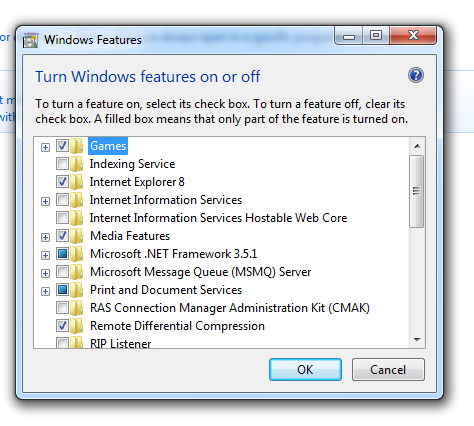
To Install MSMQ, Go to Control Panel -> Add Remove Program -> Add Windows Component and select “Message Queuing”

Install MSMQ – Microsoft Messaging Queue
There are two types of Messaging Queue:
1. Public Queue:
- Provide Message routing.
- Public queues are accessed through “Machine nameQueue name”
2. Private Queue:
- Do not Provide any routing.
- Private queues are accessed through “Machine namePrivate$Queue name”.
- If MSMQ is installed on the same machine as your application then you can replace the machine name with a dot, for example “.Private$testQue”
MSMQ is deployed in two mode:
1. Workgroup mode
- only private Queue therefore no messaging routing
- only “Common” and “Trigger” components needed.
2. Domain mode
- private and public queue.
- Machine that installed MSMQ must be the part of domain and uses Active Directory.
- “Common”, “Trigger”, “Active Directory Integration”, “Routing Suport” components are needed.
MSMQ Installs two window services also:
- Message Queueing
- Message Queueing Triggers
Administrative interface:
To Open admin Panel , My Computer -> Manage -> Services and Applications -> Message Queueing.

Under each queue you will find following three items:
1. Queue Messages
- All the messages currently seating in Queue.
- You can view the properties of all messages but cannot change it.
- Cannot create new messages or cannot delete an individual existing messages.
- You can delete all the messages by right click on “Queue messages” and select “All Tasks | Purge”
2. Journal Messages
- During Queue creation journal can be “enabled” means a copy of message from queue is placed into journal.
- Means you have the copy of all messages of queue which is read or processed.
- Purge (Delete) messages regulary from journal otherwise its size will be increased.
3. Triggers
- Allows to register the Trigger when message is placed in Queue.
- During Trigger setting you can specify COM component or external executable.
Other than Public and Private Queue, one more Queue is present which is“System Queue”. Which cannot be modified or removed.
Under System Queue you will find following three items:
1. Journal Messages:
- During Queue creation journal can be “enabled” means a copy of message from queue is placed into journal. And if the journal is not enabled then copy of message is placed in “System queue’s journal” (condition it should be enabled at code). Means its your choice that you want to maintain journal at system queue level or message queue level.
2. Dead – Letter Messages :
- copy of all the Messages which are not delivered or expired before deliver or expired before its read / received (condition it should be enabled at code).
3. Transactional Dead – Letter Messages:
- Same as “Dead – Letter Messages” but its for Transactional Messages.