While working with Demo data in Dynamics 365, I recently encountered an issue where I was unable to add or edit a reply to an RFQ (Request for Quotation).
At first glance, everything looked correct—the RFQ was created properly, vendors were added, and the workflow seemed fine. However, the reply option was disabled, making it impossible to proceed.
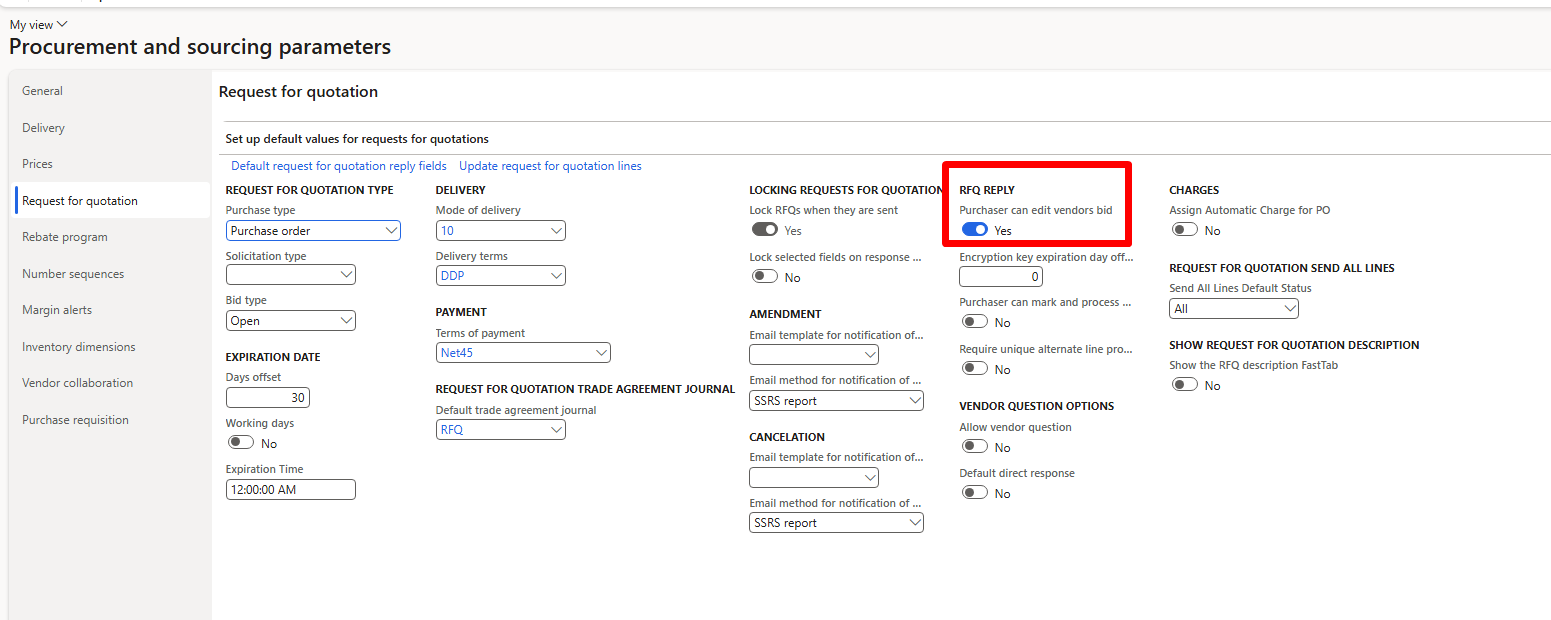
After investigating the setup, I found the root cause was a missing parameter configuration.
Root Cause: RFQ Edit Permission Disabled
In Dynamics 365 Procurement and Sourcing, RFQ behavior is controlled by system parameters. In Demo data, one critical parameter is disabled by default, which blocks RFQ replies.
✅ Solution: Enable RFQ Editing for Purchasers
To resolve the issue, follow these steps:
- Navigate to
Procurement and Sourcing > Setup > Procurement and Sourcing Parameters - Open the Request for Quotation tab
- Set the following parameter to True:
“Purchaser can edit” - Save the changes